Cisco SD-WAN extension
- Latest Dynatrace
- Extension
Monitor Cisco SD-WAN overlay performance with device, site, tunnel, and network health metrics collected via the vManage REST API.
Get started
Overview
The Cisco SD-WAN extension uses the Cisco Catalyst SD-WAN Manager API to collect performance metrics for a Cisco SD-WAN fabric managed by one or multiple Cisco SD-WAN Managers (also known as vManage).
Use cases
- Monitor your entire network infrastructure with Dynatrace
- Gain insights into your Cisco Catalyst SD-WAN infrastructure
- Extend Dynatrace visibility into Cisco SD-WAN fabric performance
Requirements
- You need access to the Cisco SD-WAN Manager (vManage) API.
- You need network connectivity between the ActiveGate where you deploy the extension and the vManage systems (vManage virtual IP (VIP) or individual vManage nodes).
Compatibility information
Cisco vManage API version 20.15 and above (tested on 20.15). Cisco documented no breaking changes in the used APIs up to version 20.18.
This integration was implemented and tested on vManage version 20.15. You can expect it to be compatible with version 20.15 and later. Compatibility with earlier versions is not guaranteed, although the extension may function with some earlier versions.
Activation and setup
Cisco SD-WAN Manager configuration
For the Dynatrace integration, we recommend creating a dedicated user with read-only privileges.
-
optional Create a dedicated role (for example,
dynatrace-readonly) with read-only privileges.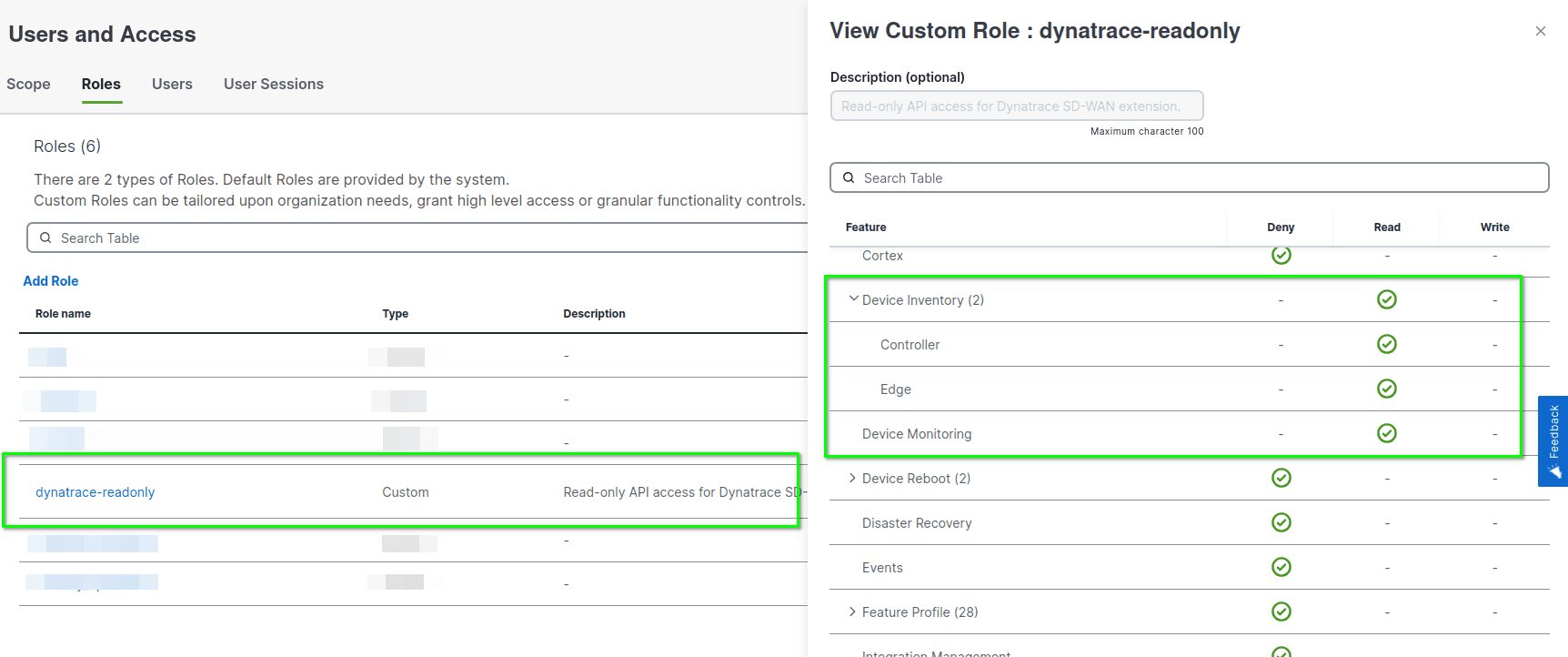 Create role
- Configure the custom role with Read access for:
- Device Inventory (both subroles: Controller and Edge)
- Device Monitoring
- Alarms
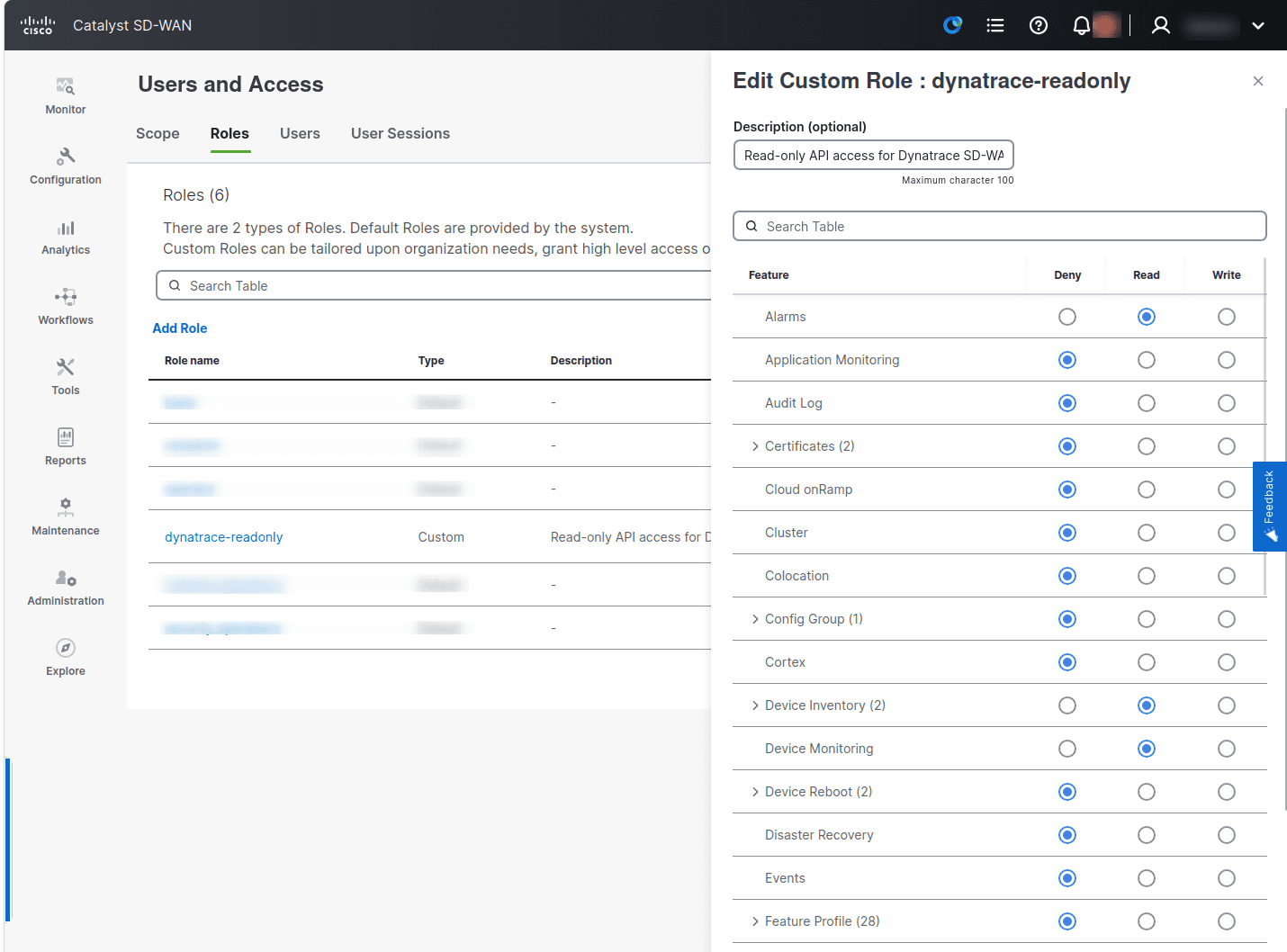 Device Inventory, Device Monitoring and Alarms role permissions
 - Configure the custom role with Read access for:
-
Create a dedicated user (for example,
dynatrace-api) with thedynatrace-readonlyrole.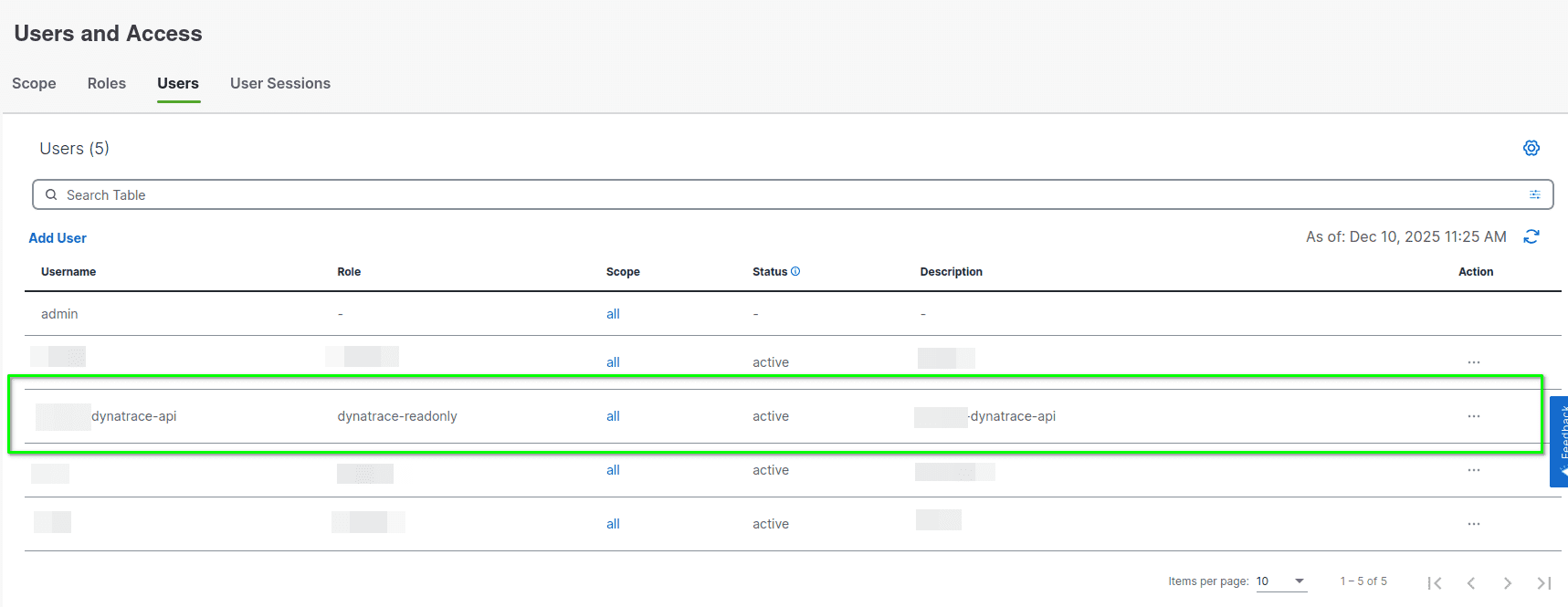 Create user
Extension activation
To activate remote monitoring of your SD-WAN fabric:
-
Activate the extension in the Dynatrace Hub.
Go to Hub, find the Cisco SD-WAN extension, and select Add to environment.
-
Add a new monitoring configuration.
You can configure the extension to use the vManage virtual IP (VIP) or individual vManage node endpoints that are part of the same logical Cisco SD-WAN Manager (vManage) cluster and manage the same SD-WAN fabric.
Details
The extension obtains metrics from the Statistics and Device State APIs. It uses Session-based authentication to authenticate with vManage and access the API.
Extension package contents
- Extension code (Python) that connects to the vManage API endpoints to collect device state and statistics data
- Dashboards offering high-level Cisco SD-WAN infrastructure overview
- Four alert templates:
- Cisco SD-WAN—ISP Circuit Down: A WAN transport lost both its BFD sessions and its control connections.
- Cisco SD-WAN—Certificate Expired, Certificate Expiry Imminent (7 days), and Certificate Expiring Soon (30 days): The three templates don't overlap, so one certificate raises only one problem.
- Unified Analysis pages for Cisco SD-WAN Infrastructure, sites, devices, device interfaces, and transport locators
- Analysis screens integrated with the
 Infrastructure & Operations app available on the Dynatrace platform
Summary of the entities monitored
- SD-WAN Infrastructure
- SD-WAN Sites
- Devices – based on device state (health, QoE) and statistics data
- Device Interfaces – based on the Interface statistics
- Transport Locators (TLOC) – based on the Application-Aware Routing statistics aggregated by Local System IP, Color and Encapsulation Protocol
Extension metrics grouping (Feature sets)
The following feature sets categorize various metrics collected by the Cisco SD-WAN extension:
| Feature set | Description |
|---|---|
default | Provides generic network interface and device-specific metricsused in |
advanced_interface | Optional Provides additional generic network interface metrics. |
fabric_infra | Covers Infrastructure, Sites, and Devices health summary and overall metrics and Inventory state metrics. These metrics correspond to data visualized in the vManage Overview Dashboard. |
device_health | Captures device health and basic performance metrics (health, QoE, CPU load, memory utilization, reachability) for individual devices. |
device_statistics | Covers detailed device CPU, memory, processes, and disk metrics (typically reported by vManage API with 1-minute aggregation). |
interface_statistics | Captures interface metrics (typically reported by vManage API with 5-minute aggregation). |
approute_statistics | Captures TLOC metrics (typically reported by vManage API with 10-minute aggregation). |
alarms | Captures SD-WAN alarm count metrics. |
events | Optional Captures count metrics for SD-WAN events, per device and severity. Adds one API call per collection cycle. Report SD-WAN Events as Logs controls event log records separately, and they don't need this feature set. |
circuit_availability | Optional Captures control-connection and BFD-session counters per WAN transport (per ISP circuit), used to detect silent circuit failures. Adds one API call per collection cycle. |
device_control_plane | Captures per-device control-plane session counters: controller connections, OMP peers, BFD sessions, and TLOC counts. Doesn't add API calls. These are device totals, so they don't match the per-transport counters of |
certificates | Optional Captures the days remaining before each device certificate expires, for controllers and edge routers. Comes with three non-overlapping alert templates. |
self-monitoring | Optional Metrics for fine-tuning and diagnostics of the extension itself. |
Extension metrics naming conventions
Generic network interface and device metrics (prefixed with com.dynatrace.extension.network_device) follow naming conventions used in Infrastructure & Operations.
Extension-specific metric names (prefixed with cisco.sdwan) and their dimension names follow naming conventions used by the vManage API. If you're familiar with the vManage API model, you'll recognize the property names used for these metrics and dimensions.
Licensing and costs
There is no charge to use the extension. You are only charged for the data that the extension ingests.
The Cisco SD-WAN extension ingests custom metrics, which consume Davis Data Units (DDUs) (Dynatrace classic license) or Metrics powered by Grail (DPS), according to your license model.
The following formula provides approximate data points ingested per minute, assuming all feature sets are enabled and assuming default data collection interval and default statistics aggregation times:
(5 (featureSet: fabric_infra)+ 1 * <Number of Alarms by : {device, severity, rulename}> (featureSet: alarms)+ 1 * <Number of Events by : {device, severity}> // Optional (featureSet: events)+ 4 * <Number of Sites> (featureSet: fabric_infra)+ 5 * <Number of Devices> (featureSet: device_health)+ 6 * <Number of Device Transports> // Optional - Circuit availability metrics (featureSet: circuit_availability, fewer on controller transports, which report no BFD sessions)+ 10 * <Number of Devices> // Control-plane counters (featureSet: device_control_plane, fewer where a counter is not reported, e.g. controllers have no BFD sessions)+ 1 * <Number of Devices with a certificate> // Optional - Certificate expiry (featureSet: certificates), collected every 30 minutes by default, not every cycle+ 24 // Optional - Self monitoring metrics (featureSet: self-monitoring, ignoring error counters not reported on normal operation)) / <collection-interval-default-5min> data points per minute+(11 * <Number of Devices> (featureSet: device_statistics)) / <statistics-aggregation-default-1min> data points per minute+(16 * <Number of Interfaces> (featureSet: interface_statistics)) / <statistics-aggregation-default-5min> data points per minute+(7 * <Number of TLOCs> (featureSet: approute_statistics)) / <statistics-aggregation-default-10min> data points per minute
Dynatrace Platform Subscription
In the Dynatrace Platform Subscription, metric ingestion consumes Metrics powered by Grail according to the number of ingested metric data points.
To calculate the approximate yearly consumption, apply the following calculation: <metric data points per minute> * 60 minutes * 24 hours * 365 days.
Dynatrace classic license
In the classic licensing model, metric ingestion consumes Davis Data Units (DDUs) at the rate of .001 DDUs per metric data point. Multiply the above formula for annual data points by .001 to estimate annual DDU usage.
The DDU cost above does not include any possible log events or custom events that the extension triggers. For more information, see DDU events.
Feature sets
When activating your extension using a monitoring configuration, you can limit monitoring to one of the feature sets. To work properly, the extension has to collect at least one metric after the activation.
In highly segmented networks, feature sets can reflect the segments of your environment. Then, when you create a monitoring configuration, you can select a feature set and a corresponding ActiveGate group that can connect to this particular segment.
All metrics that aren't categorized into any feature set are considered to be the default and are always reported.
A metric inherits the feature set of a subgroup, which in turn inherits the feature set of a group. Also, the feature set defined on the metric level overrides the feature set defined on the subgroup level, which in turn overrides the feature set defined on the group level.
fabricInfra
| Metric name | Metric key | Description |
|---|---|---|
| Sites Health | cisco.sdwan.fabric_infra.site_health_count.gauge | Number of Sites per Health Code |
| Devices Health | cisco.sdwan.fabric_infra.device_health_count.gauge | Number of Devices per Health Code |
| Hardware Status | cisco.sdwan.fabric_infra.hardware_summary_count.gauge | Number of Devices per Hardware Status Code |
| Inventory Status | cisco.sdwan.fabric_infra.inventory_summary_count.gauge | Number of Devices per Inventory Status Code |
| Tunnels Health | cisco.sdwan.fabric_infra.tunnel_health_count.gauge | Number of Tunnels per Health Code |
| Site Health | cisco.sdwan.site.site_health | Site Health Code Value (1 - Good, 3 - Fair, 5 - Poor) |
| Site's Devices Health | cisco.sdwan.site.devices_health | Site's Devices Health Code Value (1 - Good, 3 - Fair, 5 - Poor) |
| Site's Tunnels Health | cisco.sdwan.site.tunnels_health | Site's Tunnels Health Code Value (1 - Good, 3 - Fair, 5 - Poor) |
| Site's Apps Usage | cisco.sdwan.site.apps_usage | Site's Apps Usage |
| Site's Apps Health | cisco.sdwan.site.apps_health | Site's Apps Health Code Value (1 - Good, 3 - Fair, 5 - Poor) |
deviceControlPlane
| Metric name | Metric key | Description |
|---|---|---|
| Control Conns | cisco.sdwan.device.control_plane.control_connections | Total control connections this device has to controllers (vSmart, vBond and vManage), as reported by the device health response. vManage omits a counter rather than reporting zero, so this series can be absent for a device - absent is not 0. An alert pairing this metric with its counterpart must tolerate the counterpart being missing. Device total from the device health response - NOT the same scope as cisco.sdwan.device.circuit.* which is per transport colour from the TLOC API; the two can legitimately differ, for example a vBond has control connections but no TLOC rows. |
| Control Conns Up | cisco.sdwan.device.control_plane.control_connections_up | Control connections currently up to controllers. Compare against control_connections to detect a partial control-plane failure. vManage omits a counter rather than reporting zero, so this series can be absent for a device - absent is not 0. An alert pairing this metric with its counterpart must tolerate the counterpart being missing. Device total from the device health response - NOT the same scope as cisco.sdwan.device.circuit.* which is per transport colour from the TLOC API; the two can legitimately differ, for example a vBond has control connections but no TLOC rows. |
| vSmart Control Conns | cisco.sdwan.device.control_plane.vsmart_control_connections | Control connections this device has to vSmart controllers. Populated for edges as well as controllers. vManage omits a counter rather than reporting zero, so this series can be absent for a device - absent is not 0. An alert pairing this metric with its counterpart must tolerate the counterpart being missing. Device total from the device health response - NOT the same scope as cisco.sdwan.device.circuit.* which is per transport colour from the TLOC API; the two can legitimately differ, for example a vBond has control connections but no TLOC rows. |
| Expected vSmart Conns | cisco.sdwan.device.control_plane.expected_vsmart_connections | Control connections to vSmart controllers this device is expected to have. Compare against vsmart_control_connections to detect a missing controller session. vManage omits a counter rather than reporting zero, so this series can be absent for a device - absent is not 0. An alert pairing this metric with its counterpart must tolerate the counterpart being missing. Device total from the device health response - NOT the same scope as cisco.sdwan.device.circuit.* which is per transport colour from the TLOC API; the two can legitimately differ, for example a vBond has control connections but no TLOC rows. |
| OMP Peers | cisco.sdwan.device.control_plane.omp_peers | Total Overlay Management Protocol (OMP) peers configured for this device. vManage omits a counter rather than reporting zero, so this series can be absent for a device - absent is not 0. An alert pairing this metric with its counterpart must tolerate the counterpart being missing. Device total from the device health response - NOT the same scope as cisco.sdwan.device.circuit.* which is per transport colour from the TLOC API; the two can legitimately differ, for example a vBond has control connections but no TLOC rows. |
| OMP Peers Up | cisco.sdwan.device.control_plane.omp_peers_up | OMP peers currently in an up state. Compare against omp_peers to detect a lost overlay routing session. vManage omits a counter rather than reporting zero, so this series can be absent for a device - absent is not 0. An alert pairing this metric with its counterpart must tolerate the counterpart being missing. Device total from the device health response - NOT the same scope as cisco.sdwan.device.circuit.* which is per transport colour from the TLOC API; the two can legitimately differ, for example a vBond has control connections but no TLOC rows. |
| BFD Sessions | cisco.sdwan.device.control_plane.bfd_sessions | Total Bidirectional Forwarding Detection (BFD) sessions on this device. Controllers have none, so the value is often absent for them. vManage omits a counter rather than reporting zero, so this series can be absent for a device - absent is not 0. An alert pairing this metric with its counterpart must tolerate the counterpart being missing. Device total from the device health response - NOT the same scope as cisco.sdwan.device.circuit.* which is per transport colour from the TLOC API; the two can legitimately differ, for example a vBond has control connections but no TLOC rows. |
| BFD Sessions Up | cisco.sdwan.device.control_plane.bfd_sessions_up | BFD sessions currently up. Compare against bfd_sessions to detect data-plane tunnel loss. vManage omits a counter rather than reporting zero, so this series can be absent for a device - absent is not 0. An alert pairing this metric with its counterpart must tolerate the counterpart being missing. Device total from the device health response - NOT the same scope as cisco.sdwan.device.circuit.* which is per transport colour from the TLOC API; the two can legitimately differ, for example a vBond has control connections but no TLOC rows. |
| TLOCs Total | cisco.sdwan.device.control_plane.total_tloc_num | Total Transport Locators (TLOC) on this device. vManage omits a counter rather than reporting zero, so this series can be absent for a device - absent is not 0. An alert pairing this metric with its counterpart must tolerate the counterpart being missing. Device total from the device health response - NOT the same scope as cisco.sdwan.device.circuit.* which is per transport colour from the TLOC API; the two can legitimately differ, for example a vBond has control connections but no TLOC rows. |
| TLOCs Up | cisco.sdwan.device.control_plane.up_tloc_num | Transport Locators currently up. Compare against total_tloc_num to detect a failed transport. vManage omits a counter rather than reporting zero, so this series can be absent for a device - absent is not 0. An alert pairing this metric with its counterpart must tolerate the counterpart being missing. Device total from the device health response - NOT the same scope as cisco.sdwan.device.circuit.* which is per transport colour from the TLOC API; the two can legitimately differ, for example a vBond has control connections but no TLOC rows. |
alarms
| Metric name | Metric key | Description |
|---|---|---|
| Alarm Count | cisco.sdwan.device.alarm_count.gauge | SD-WAN Device Alarm Count. Alarms counted per interval (Alarm Count Resolution, 15 minutes by default), each data point timestamped with the interval it covers. Aggregate this metric with SUM, not AVG - averaging divides the count across devices, components and rule names and understates it heavily. |
circuitAvailability
| Metric name | Metric key | Description |
|---|---|---|
| TLOC Control Conns Up | cisco.sdwan.device.circuit.control_connections_up | Number of active control connections from this transport to controllers |
| TLOC Control Conns Down | cisco.sdwan.device.circuit.control_connections_down | Number of failed control connections from this transport to controllers |
| TLOC BFD Sessions Up | cisco.sdwan.device.circuit.bfd_sessions_up | Active BFD sessions on this transport (edge routers only; absent on controllers) |
| TLOC BFD Sessions Down | cisco.sdwan.device.circuit.bfd_sessions_down | Inactive BFD sessions on this transport (edge routers only; absent on controllers) |
| TLOC Control Conns to vSmarts | cisco.sdwan.device.circuit.control_connections_to_vsmarts | Number of active control connections to vSmart controllers (controllers only; absent on edge routers) |
| TLOC Expected Control Conns | cisco.sdwan.device.circuit.expected_control_connections | Expected number of control connections from this transport (sparse; present on vSmarts and vManage) |
certificates
| Metric name | Metric key | Description |
|---|---|---|
| Certificate Days Remaining | cisco.sdwan.device.certificate.days_remaining | Days until this device's certificate expires. The value is SIGNED - it goes NEGATIVE once the certificate has expired, so -30 means it expired 30 days ago. Reported only for devices that actually have a certificate; unprovisioned inventory rows are skipped. |
events
| Metric name | Metric key | Description |
|---|---|---|
| SD-WAN Event Count | cisco.sdwan.device.event_count.gauge | SD-WAN Device Event Count. Counts SD-WAN events reported by Cisco SD-WAN Manager (these are SD-WAN events, not Dynatrace events) per device and severity, per 5-minute interval. Each data point is timestamped with the interval it covers. Aggregate this metric with SUM, not AVG - averaging divides the count across devices and understates it heavily. Counts every severity, including those the Event Severity Filter excludes from the event log records. Event component is reported on the event log record, not as a metric dimension. |
self-monitoring
| Metric name | Metric key | Description |
|---|---|---|
| Total duration of all rate-limited executed queries to all connection urls to collect data reported as metrics | sfm.cisco.sdwan.monitor.run.total.duration | — |
| Total duration of all rate-limited synchronously executed queries to all connection urls to collect data reported as metrics | sfm.cisco.sdwan.monitor.run.sync.duration | — |
| Metrics Data Collection Overall Asynchronous Time | sfm.cisco.sdwan.monitor.run.async.duration | Total duration of all rate-limited asynchronously executed queries to all connection urls to collect data reported as metrics |
| Metrics Data Collection Error | sfm.cisco.sdwan.monitor.run.error | Indicates whether an unhandled error occurred during execution of Metrics Data Collection. |
| get_site_health_stats Query Time | sfm.cisco.sdwan.get_site_health_stats.duration | — |
| get_site_health_stats Error | sfm.cisco.sdwan.get_site_health_stats.error | Indicates whether an error occurred during get_site_health_stats Query |
| report_site_health_stats Overall Time | sfm.cisco.sdwan.report_site_health_stats.duration | Wall-clock time of report_site_health_stats(). Unlike every other report_*.duration this one IS the real cost of the method: it runs alone, before the ThreadPoolExecutor, because it builds the site and device maps every other method depends on. Measured 2026-08-31 at 0.12s, matching its own get_*.duration - which is what proves the other report_* values are pool wall-clock, not per-method cost. |
| report_site_health_stats Error | sfm.cisco.sdwan.report_site_health_stats.error | Indicates whether an error occurred during report_site_health_stats |
| get_vedge_inventory_summary Query Time | sfm.cisco.sdwan.get_vedge_inventory_summary.duration | — |
| get_vedge_inventory_summary Error | sfm.cisco.sdwan.get_vedge_inventory_summary.error | Indicates whether an error occurred during get_vedge_inventory_summary Query |
| report_vedge_inventory_summary Overall Time | sfm.cisco.sdwan.report_vedge_inventory_summary.duration | Wall-clock time of report_vedge_inventory_summary(), measured inside the parallel collection phase - NOT the cost of the method itself. Most report_* methods run together in a thread pool, so under the GIL this value is dominated by the other threads and converges on the length of the whole parallel phase. Measured 2026-08-31: every get_*.duration was below 1s while report_* values formed a ladder up to 37s. Read the matching get_*.duration for the real API cost. |
| report_vedge_inventory_summary Error | sfm.cisco.sdwan.report_vedge_inventory_summary.error | Indicates whether an error occurred during report_vedge_inventory_summary |
| get_device_health_overview_stats Query Time | sfm.cisco.sdwan.get_device_health_overview_stats.duration | — |
| get_device_health_overview_stats Error | sfm.cisco.sdwan.get_device_health_overview_stats.error | Indicates whether an error occurred during get_device_health_overview_stats Query |
| report_device_health_overview Overall Time | sfm.cisco.sdwan.report_device_health_overview.duration | Wall-clock time of report_device_health_overview(), measured inside the parallel collection phase - NOT the cost of the method itself. Most report_* methods run together in a thread pool, so under the GIL this value is dominated by the other threads and converges on the length of the whole parallel phase. Measured 2026-08-31: every get_*.duration was below 1s while report_* values formed a ladder up to 37s. Read the matching get_*.duration for the real API cost. |
| report_device_health_overview Error | sfm.cisco.sdwan.report_device_health_overview.error | Indicates whether an error occurred during report_device_health_overview |
| get_hardware_health_summary Query Time | sfm.cisco.sdwan.get_hardware_health_summary.duration | — |
| get_hardware_health_summary Error | sfm.cisco.sdwan.get_hardware_health_summary.error | Indicates whether an error occurred during get_hardware_health_summary Query |
| report_hardware_health_summary Overall Time | sfm.cisco.sdwan.report_hardware_health_summary.duration | Wall-clock time of report_hardware_health_summary(), measured inside the parallel collection phase - NOT the cost of the method itself. Most report_* methods run together in a thread pool, so under the GIL this value is dominated by the other threads and converges on the length of the whole parallel phase. Measured 2026-08-31: every get_*.duration was below 1s while report_* values formed a ladder up to 37s. Read the matching get_*.duration for the real API cost. |
| report_hardware_health_summary Error | sfm.cisco.sdwan.report_hardware_health_summary.error | Indicates whether an error occurred during report_hardware_health_summary |
| get_remote_system_cardinality Query Time | sfm.cisco.sdwan.get_remote_system_cardinality.duration | — |
| get_remote_system_cardinality Error | sfm.cisco.sdwan.get_remote_system_cardinality.error | Indicates whether an error occurred during get_approute_statistics_remote_system_cardinality Query |
| report_remote_system_cardinality Overall Time | sfm.cisco.sdwan.report_remote_system_cardinality.duration | Wall-clock time of report_remote_system_cardinality(), measured inside the parallel collection phase - NOT the cost of the method itself. Most report_* methods run together in a thread pool, so under the GIL this value is dominated by the other threads and converges on the length of the whole parallel phase. Measured 2026-08-31: every get_*.duration was below 1s while report_* values formed a ladder up to 37s. Read the matching get_*.duration for the real API cost. |
| report_remote_system_cardinality Error | sfm.cisco.sdwan.report_remote_system_cardinality.error | Indicates whether an error occurred during report_remote_system_cardinality |
| get_tunnel_health_overview Query Time | sfm.cisco.sdwan.get_tunnel_health_overview.duration | — |
| get_tunnel_health_overview Error | sfm.cisco.sdwan.get_tunnel_health_overview.error | Indicates whether an error occurred during get_tunnel_health_overview Query |
| report_tunnel_health_overview Overall Time | sfm.cisco.sdwan.report_tunnel_health_overview.duration | Wall-clock time of report_tunnel_health_overview(), measured inside the parallel collection phase - NOT the cost of the method itself. Most report_* methods run together in a thread pool, so under the GIL this value is dominated by the other threads and converges on the length of the whole parallel phase. Measured 2026-08-31: every get_*.duration was below 1s while report_* values formed a ladder up to 37s. Read the matching get_*.duration for the real API cost. |
| report_tunnel_health_overview Error | sfm.cisco.sdwan.report_tunnel_health_overview.error | Indicates whether an error occurred during report_tunnel_health_overview |
| get_approute_statistics_aggregation Query Time | sfm.cisco.sdwan.get_approute_statistics_aggregation.duration | — |
| get_approute_statistics_aggregation Error | sfm.cisco.sdwan.get_approute_statistics_aggregation.error | Indicates whether an error occurred during get_approute_statistics_aggregation Query |
| report_statistics_approute Overall Time | sfm.cisco.sdwan.report_statistics_approute.duration | Wall-clock time of report_statistics_approute(), measured inside the parallel collection phase - NOT the cost of the method itself. Most report_* methods run together in a thread pool, so under the GIL this value is dominated by the other threads and converges on the length of the whole parallel phase. Measured 2026-08-31: every get_*.duration was below 1s while report_* values formed a ladder up to 37s. Read the matching get_*.duration for the real API cost. |
| report_statistics_approute Error | sfm.cisco.sdwan.report_statistics_approute.error | Indicates whether an error occurred during report_statistics_approute |
| get_devices_health Query Time | sfm.cisco.sdwan.get_devices_health.duration | — |
| get_devices_health Error | sfm.cisco.sdwan.get_devices_health.error | Indicates whether an error occurred during get_devices_health Query |
| report_devices_health Overall Time | sfm.cisco.sdwan.report_devices_health.duration | Wall-clock time of report_devices_health(), measured inside the parallel collection phase - NOT the cost of the method itself. Most report_* methods run together in a thread pool, so under the GIL this value is dominated by the other threads and converges on the length of the whole parallel phase. Measured 2026-08-31: every get_*.duration was below 1s while report_* values formed a ladder up to 37s. Read the matching get_*.duration for the real API cost. |
| report_devices_health Error | sfm.cisco.sdwan.report_devices_health.error | Indicates whether an error occurred during report_devices_health |
| get_statistics_system_aggregation Query Time | sfm.cisco.sdwan.get_statistics_system_aggregation.duration | — |
| get_statistics_system_aggregation Error | sfm.cisco.sdwan.get_statistics_system_aggregation.error | Indicates whether an error occurred during get_statistics_system_aggregation Query |
| get_interface_statistics Query Time | sfm.cisco.sdwan.get_interface_statistics.duration | — |
| get_interface_statistics Error | sfm.cisco.sdwan.get_interface_statistics.error | Indicates whether an error occurred during get_interface_statistics Query |
| report_statistics_system Overall Time | sfm.cisco.sdwan.report_statistics_system.duration | Wall-clock time of report_statistics_system(), measured inside the parallel collection phase - NOT the cost of the method itself. Most report_* methods run together in a thread pool, so under the GIL this value is dominated by the other threads and converges on the length of the whole parallel phase. Measured 2026-08-31: every get_*.duration was below 1s while report_* values formed a ladder up to 37s. Read the matching get_*.duration for the real API cost. |
| report_statistics_system Error | sfm.cisco.sdwan.report_statistics_system.error | Indicates whether an error occurred during report_statistics_system |
| report_statistics_interface Overall Time | sfm.cisco.sdwan.report_statistics_interface.duration | Wall-clock time of report_statistics_interface(), measured inside the parallel collection phase - NOT the cost of the method itself. Most report_* methods run together in a thread pool, so under the GIL this value is dominated by the other threads and converges on the length of the whole parallel phase. Measured 2026-08-31: every get_*.duration was below 1s while report_* values formed a ladder up to 37s. Read the matching get_*.duration for the real API cost. |
| report_statistics_interface Error | sfm.cisco.sdwan.report_statistics_interface.error | Indicates whether an error occurred during report_statistics_interface |
| — | sfm.cisco.sdwan.get_alarms_count.duration | — |
| — | sfm.cisco.sdwan.get_alarms_count.error | — |
| — | sfm.cisco.sdwan.get_alarms_aggregation.duration | — |
| — | sfm.cisco.sdwan.get_alarms_aggregation.error | — |
| — | sfm.cisco.sdwan.get_alarms.duration | — |
| — | sfm.cisco.sdwan.get_alarms.error | — |
| — | sfm.cisco.sdwan.report_alarm_counts.duration | — |
| — | sfm.cisco.sdwan.report_alarm_counts.error | — |
| — | sfm.cisco.sdwan.report_alarm_log_events.duration | — |
| — | sfm.cisco.sdwan.report_alarm_log_events.error | — |
| get_events Query Time | sfm.cisco.sdwan.get_events.duration | — |
| get_events Error | sfm.cisco.sdwan.get_events.error | Indicates whether an error occurred during get_events |
| report_event_log_events Overall Time | sfm.cisco.sdwan.report_event_log_events.duration | Wall-clock time of report_event_log_events(), measured inside the parallel collection phase - NOT the cost of the method itself. Most report_* methods run together in a thread pool, so under the GIL this value is dominated by the other threads and converges on the length of the whole parallel phase. Measured 2026-08-31: every get_*.duration was below 1s while report_* values formed a ladder up to 37s. Read the matching get_*.duration for the real API cost. |
| report_event_log_events Error | sfm.cisco.sdwan.report_event_log_events.error | Indicates whether an error occurred during report_event_log_events |
| get_event_counts Query Time | sfm.cisco.sdwan.get_event_counts.duration | — |
| get_event_counts Error | sfm.cisco.sdwan.get_event_counts.error | Indicates whether an error occurred during get_event_counts |
| report_event_counts Overall Time | sfm.cisco.sdwan.report_event_counts.duration | Wall-clock time of report_event_counts(), measured inside the parallel collection phase - NOT the cost of the method itself. Most report_* methods run together in a thread pool, so under the GIL this value is dominated by the other threads and converges on the length of the whole parallel phase. Measured 2026-08-31: every get_*.duration was below 1s while report_* values formed a ladder up to 37s. Read the matching get_*.duration for the real API cost. |
| report_event_counts Error | sfm.cisco.sdwan.report_event_counts.error | Indicates whether an error occurred during report_event_counts |
| get_tloc_status Query Time | sfm.cisco.sdwan.get_tloc_status.duration | — |
| get_tloc_status Error | sfm.cisco.sdwan.get_tloc_status.error | Indicates whether an error occurred during get_tloc_status Query |
| report_tloc_status Overall Time | sfm.cisco.sdwan.report_tloc_status.duration | Wall-clock time of report_tloc_status(), measured inside the parallel collection phase - NOT the cost of the method itself. Most report_* methods run together in a thread pool, so under the GIL this value is dominated by the other threads and converges on the length of the whole parallel phase. Measured 2026-08-31: every get_*.duration was below 1s while report_* values formed a ladder up to 37s. Read the matching get_*.duration for the real API cost. |
| report_tloc_status Error | sfm.cisco.sdwan.report_tloc_status.error | Indicates whether an error occurred during report_tloc_status |
| get_certificates Query Time | sfm.cisco.sdwan.get_certificates.duration | — |
| get_certificates Error | sfm.cisco.sdwan.get_certificates.error | — |
| report_certificates Query Time | sfm.cisco.sdwan.report_certificates.duration | Wall-clock time of report_certificates(), measured inside the parallel collection phase - NOT the cost of the method itself. Most report_* methods run together in a thread pool, so under the GIL this value is dominated by the other threads and converges on the length of the whole parallel phase. Measured 2026-08-31: every get_*.duration was below 1s while report_* values formed a ladder up to 37s. Read the matching get_*.duration for the real API cost. |
| report_certificates Error | sfm.cisco.sdwan.report_certificates.error | — |
approuteStatistics
| Metric name | Metric key | Description |
|---|---|---|
| TLOC QoE | cisco.sdwan.tloc.vqoe_score | SD-WAN TLOC QoE Score aggregated as average across all mapped tunnels |
| TLOC Loss | cisco.sdwan.tloc.loss_percentage | SD-WAN TLOC Loss Percentage aggregated as average across all mapped tunnels. Tunnels reporting exactly 100% loss (unreachable remote end, carrying only BFD probes and no payload traffic) are excluded from the average. |
| TLOC Latency | cisco.sdwan.tloc.latency | SD-WAN TLOC Latency aggregated as average across all mapped tunnels |
| TLOC Jitter | cisco.sdwan.tloc.jitter | SD-WAN TLOC Jitter aggregated as average across all mapped tunnels |
| TLOC TX Octets | cisco.sdwan.tloc.tx_octets | SD-WAN TLOC TX Octets aggregated as sum across all mapped tunnels |
| TLOC RX Octets | cisco.sdwan.tloc.rx_octets | SD-WAN TLOC RX Octets aggregated as sum across all mapped tunnels |
| TLOC Tunnels | cisco.sdwan.tloc.tunnel_count.gauge | SD-WAN TLOC Tunnels determined by the cardinality of the Remote System IPs |
deviceStatistics
| Metric name | Metric key | Description |
|---|---|---|
| CPU System | cisco.sdwan.device.cpu_system | SD-WAN Device CPU System Utilization |
| CPU User | cisco.sdwan.device.cpu_user | SD-WAN Device CPU User Utilization |
| CPU Idle | cisco.sdwan.device.cpu_idle | SD-WAN Device CPU Idle |
| Memory Used | cisco.sdwan.device.mem_used | SD-WAN Device Memory Used |
| Memory Free | cisco.sdwan.device.mem_free | SD-WAN Device Memory Free |
| Memory Buffers | cisco.sdwan.device.mem_buffers | SD-WAN Device Memory Buffers |
| Memory Cached | cisco.sdwan.device.mem_cached | SD-WAN Device Memory Cached |
| Processes Total | cisco.sdwan.device.totalp | SD-WAN Device Total Processes |
| Processes Running | cisco.sdwan.device.runningp | SD-WAN Device Running Processes |
| Disk Used | cisco.sdwan.device.disk_used | SD-WAN Device Disk Used |
| Disk Available | cisco.sdwan.device.disk_avail | SD-WAN Device Disk Available |
default
| Metric name | Metric key | Description |
|---|---|---|
| — | com.dynatrace.extension.network_device.cpu_usage | — |
| — | com.dynatrace.extension.network_device.memory_usage | — |
| — | com.dynatrace.extension.network_device.sysuptime | — |
| — | com.dynatrace.extension.network_device.memory_used | — |
| — | com.dynatrace.extension.network_device.memory_free | — |
| — | com.dynatrace.extension.network_device.if.status | — |
| — | com.dynatrace.extension.network_device.if.bytes_in.count | — |
| — | com.dynatrace.extension.network_device.if.bytes_out.count | — |
| — | com.dynatrace.extension.network_device.if.in.errors.count | — |
| — | com.dynatrace.extension.network_device.if.out.errors.count | — |
| — | com.dynatrace.extension.network_device.if.in.discards.count | — |
| — | com.dynatrace.extension.network_device.if.out.discards.count | — |
| Monitoring Status | cisco.sdwan.fabric_infra.monitoring_status | Per-connection availability of the SD-WAN Manager (1 = client connected and reachable, 0 = not). One data point per configured connection URL. |
interfaceStatistics
| Metric name | Metric key | Description |
|---|---|---|
| Admin Status | cisco.sdwan.interface.admin_status | SD-WAN Interface Admin Status |
| Oper Status | cisco.sdwan.interface.oper_status | SD-WAN Interface Oper Status |
| RX Packets | cisco.sdwan.interface.rx_pkts | SD-WAN Interface Packets Recieved |
| RX Octets | cisco.sdwan.interface.rx_octets | SD-WAN Interface Octets Recieved |
| RX Errors | cisco.sdwan.interface.rx_errors | SD-WAN Interface RX Errors |
| RX Drops | cisco.sdwan.interface.rx_drops | SD-WAN Interface RX Drops |
| RX Packets Per Second | cisco.sdwan.interface.rx_pps | SD-WAN Interface Recieved Packets Per Second |
| RX KiloBit Per Second | cisco.sdwan.interface.rx_kbps | SD-WAN Interface Recieved KiloBit Per Second |
| TX Packets | cisco.sdwan.interface.tx_pkts | SD-WAN Interface Packets Transmitted |
| TX Octets | cisco.sdwan.interface.tx_octets | SD-WAN Interface Octets Transmitted |
| TX Errors | cisco.sdwan.interface.tx_errors | SD-WAN Interface TX Errors |
| TX Drops | cisco.sdwan.interface.tx_drops | SD-WAN Interface TX Drops |
| TX Packets Per Second | cisco.sdwan.interface.tx_pps | SD-WAN Interface Transmitted Packets Per Second |
| TX KiloBit Per Second | cisco.sdwan.interface.tx_kbps | SD-WAN Interface Transmitted KiloBit Per Second |
| Uplink Capacity Utilization | cisco.sdwan.interface.up_cap_perc | SD-WAN Interface Uplink Capacity Utilization |
| Downlink Capacity Utilization | cisco.sdwan.interface.down_cap_perc | SD-WAN Interface Downlink Capacity Usage |
advancedInterface
| Metric name | Metric key | Description |
|---|---|---|
| — | com.dynatrace.extension.network_device.if.in.pkts.count | — |
| — | com.dynatrace.extension.network_device.if.out.pkts.count | — |
deviceHealth
| Metric name | Metric key | Description |
|---|---|---|
| CPU Load | cisco.sdwan.device.cpu_load | SD-WAN Device CPU Load |
| Memory Utilization | cisco.sdwan.device.memory_utilization | SD-WAN Device Memory Utilization |
| Device Health | cisco.sdwan.device.health | SD-WAN Device Health Code Value (1 - green, 3 - yellow, 5 - red) |
| Device Reachability | cisco.sdwan.device.reachability | SD-WAN Device Reachability Code Value (1 - reachable, 0 - unreachable) |
| Device QoE | cisco.sdwan.device.qoe | SD-WAN Device QoE Score |
FAQ
Do I need to enable all feature sets?
No, not all feature sets are required.
- If you want to view PLATFORM screens (generic network device and interface metrics)within Infrastructure & Operations, only the
defaultfeature set is needed. - If you want to view both CLASSIC screens and all PLATFORM screens (generic network device and interface metrics and extension-specific metrics), enable
fabric_infra,device_health,device_statistics,interface_statistics,approute_statisticsandalarmsfeature sets depending on your needs. certificates,events,circuit_availability,advanced_interface, andself-monitoringare optional and disabled by default. For details, see Extension metrics grouping (Feature sets).device_control_planeis enabled for new monitoring configurations. For existing configurations, enable it to start collecting its metrics.advanced_interfaceis prepared for future use. Its metrics are not currently availablein the Infrastructure & Operations or in the Unified Analysis pages.self-monitoringis only needed for fine-tuning and diagnostics of the extension itself.
How is site, device, tunnel, and application health represented?
The vManage API returns health status for sites, devices, tunnels, and applications as textual values.
- Site, site devices, tunnels, and applications health:
good,fair,poor - Device health:
green,yellow,red - Device reachability:
reachable,unreachable
The extension reports health as numeric metric values representing the status returned by the vManage API, using the following mappings.
Site, Site Devices, Site Tunnels, and Applications Health
| Health Status | Metric Value |
|---|---|
|
|
|
|
|
|
Applied to:
cisco.sdwan.site.site_healthcisco.sdwan.site.devices_healthcisco.sdwan.site.tunnels_healthcisco.sdwan.site.apps_health
Device Health
| Health Status | Metric Value |
|---|---|
|
|
|
|
|
|
Applied to:
cisco.sdwan.device.health
Device Reachability
| Reachability Status | Metric Value |
|---|---|
|
|
|
|
Applied to:
cisco.sdwan.device.reachability
How are Transport Locator (TLOC) metrics calculated?
The extension reports TLOC metrics by aggregating data retrieved from the vManage API. It calculates average latency, loss, and jitter values using the vManage API query language and aggregates them by the following TLOC attributes:
- local system IP (
local_system_ip) - local color (
local_color) - encapsulation (
proto)
The extension queries the metrics from Application-Aware Routing (App-Route) statistics and aggregates them across all tunnels associated with the same local TLOC.
The extension determines the number of tunnels for a TLOC by evaluating the cardinality of remote system IPs associated with the aggregated App-Route statistics.
Why do some metric keys end in .gauge or .count, and which key do I use in DQL?
Some metrics have two keys: one in Grail and one in Dynatrace classic.
- In DQL (:notebooks: Notebooks,
 Dashboards, Grail), use the key without the suffix.
 - In Dynatrace classic (Data Explorer, classic dashboards and screens), use the key with the suffix. The metric list of this extension shows the classic key.
This affects the gauge metrics whose key ends in _count:
| Grail key (DQL) | Classic key |
|---|---|
|
|
|
|
|
|
|
|
|
|
|
|
|
|
|
|
It also affects the count metrics that are reported without a .count suffix, for example, cisco.sdwan.tloc.rx_octets and cisco.sdwan.tloc.tx_octets. In Dynatrace classic, they're cisco.sdwan.tloc.rx_octets.count and cisco.sdwan.tloc.tx_octets.count.
The reason is that a classic metric key can refer to only one payload type, so classic metrics automatically receive the .count or .gauge suffix, while Grail metrics don't. For details, see:
- Metric ingestion protocol
- The Renaming
countmetrics section of Troubleshooting for Metrics
How are Cisco SD-WAN Manager events reported, and how do they differ from alarms?
Cisco SD-WAN Manager reports two kinds of signals, and the extension handles them separately.
Alarms describe a condition, but they aren't a reliable record of its state. Cisco SD-WAN Manager raises an alarm when it detects a condition, and for many alarm types it never clears the alarm. Its own Alarm Reference says "No clearing procedure" for whole alarm families, and a lasting condition, such as an expired certificate, is re-raised as a new alarm every day. An alarm that's still marked active might therefore describe something that ended long ago.
The extension builds the state itself. It groups alarms by the condition they describe and opens one Dynatrace problem for each group. It keeps the problem open while the condition is still reported. It closes the problem when the alarm clears or when the condition is no longer reported. Each closing log record says which of the two happened.
Cisco SD-WAN alarms carry no correlation ID, so the extension groups them by condition on a best-effort basis. If the grouping doesn't match what you expect, rely on the alarm log records. They contain the alarm payload exactly as Cisco SD-WAN Manager reported it.
SD-WAN events are single points in time. An event says that something happened at one moment, for example, a DHCP address was rejected, a tracker changed state, or an IPsec key was renewed. An event is never active and never cleared.
For that reason, SD-WAN events become Dynatrace log records only—they never become Dynatrace problems. To open problems, use alarms. A busy fabric produces hundreds of events per day, which would bury the alarms that matter.
Each event becomes a log record with its severity, component, name, details, device, and site. The extension also keeps the complete original record from Cisco SD-WAN Manager.
To find your event records, run the following DQL query:
fetch logs| filter cisco_sdwan_event_type == "cisco_sdwan_event_log_event"| sort timestamp desc
Two settings on the SD-WAN Events tab of the monitoring configuration control the volume:
-
Report SD-WAN Events as Logs: Disabled by default. The extension collects no events until you enable it.
-
SD-WAN Event Severity Filter: Empty by default, which means all severities. Cisco SD-WAN Manager applies this filter itself, so the events you exclude are never transferred. Minor is by far the busiest severity: on fabrics with many operators, Minor login and logout events can dominate the stream.
The filter applies to log records only. The event count metric always counts every severity, so you can still see how much the filter excludes.
You can also enable the optional events feature set. It adds an event count metric per device and severity, and an SD-WAN Events by Severity chart. Log records don't need this feature set.
You can see events on the SD-WAN Events card on the SD-WAN infrastructure, site, and device screens.
Cisco SD-WAN Manager keeps events for about four days. If the extension doesn't run for longer than that, you can't recover the events from that period.
How do I choose which Dynatrace event type an alarm raises?
With Report Alarms as Events enabled, use List of conditions to override Default Event Type in the monitoring configuration.
- Each condition matches alarms by Alarm Severity, by Alarm Type, or by both.
- Each condition sets the Event Type, or # Suppress Event # to raise no Dynatrace event at all.
- The first matching condition wins. An alarm that matches no condition gets the Default Event Type for Alarms reported as Events.
Enter the Alarm Type as the Cisco SD-WAN Manager alarms table shows it in the Alarm Type column, with _ instead of spaces, for example, Tracker_State_Change or CERT_EXPIRED.
How does the friendly site name work?
Cisco SD-WAN Manager names a site only by its number, for example, SITE_4000. Many organizations include the real location in their device hostnames instead, for example, BRN-rtr01, BRN-rtr02, and BRN-sw01 for the Brno site.
With Friendly Site Name Pattern, you can take that part of the hostname and use it as the site name.
- The pattern is a regular expression. The extension matches it against the hostname of each device at the site, not against the site name.
- The text in the first capture group becomes the friendly name.
For example, the pattern
^(.{3})takes the first three characters of the hostname. DevicesBRN-rtr01andBRN-rtr02give the site the friendly nameBRN. - The name must come from more than half of the devices at the site, so one device with a different name can't rename the whole site. If no name reaches this majority, the extension keeps the plain site name.
- If you leave the pattern empty, the friendly site name is the same as the site name, for example,
SITE_4000.
The extension always fills in the property, so screens and dashboards always have a value to show.
Why does my friendly site name not work, and what is wrong with my pattern?
Friendly Site Name Pattern is a regular expression, and it must contain a capture group. The text inside the group becomes the friendly site name.
For example, ^(.{3}) takes the first three characters of the hostname. Without the brackets, ^.{3} is still a valid expression, but it captures nothing, so the extension produces no friendly name.
If the pattern is invalid, the extension reports a warning and ignores the pattern. It uses the plain site name instead, and metric collection continues.
How do the control plane, circuit availability, and TLOC metrics relate?
Three feature sets cover the same fabric from three different angles. They complement each other—they aren't alternatives, and their numbers aren't meant to match.
| Feature set | Reported per | Answers |
|---|---|---|
| Device | Does this device have all its sessions up? |
| Device and WAN transport (color) | Which circuit is down? |
| Transport Locator (TLOC) | How good is the traffic on this transport? |
device_control_planecounts sessions per device: control connections, OMP peers, BFD sessions, and Transport Locators, each with a matching up counter. Compare the two. For example, if a device should have three OMP peers and only two are up, one overlay routing session is down. These values come from the device health response, so they don't add API calls.circuit_availabilitysplits the same kinds of sessions per WAN transport. This tells you which ISP circuit failed, not only that something failed.approute_statisticsmeasures quality, not counts: latency, loss, jitter, and tunnel count per TLOC. A circuit can be up and still be unusable.
When something is wrong, the usual order is:
- Control plane metrics tell you that a device has a problem.
- Circuit availability metrics tell you where.
- TLOC metrics tell you how bad the path is.
Controllers only appear in the device totals.
vSmart, vBond, and vManage carry control connections but have no WAN transports, so they're absent from every per-transport series. A vBond can report a dozen control connections at the device level and nothing per transport.
Before device_control_plane, controller control-plane health wasn't visible as a metric at all. This is the main gap that the feature set closes.
Per-transport counters and device totals come from different API responses at a different granularity, and controllers contribute to one and not the other. A difference is expected and is not a collection error.
Why is a control plane metric missing for some devices?
A missing metric value doesn't mean zero. Cisco SD-WAN Manager leaves a counter out of its response instead of sending a zero, and the extension then reports no value for it.
This happens most often with BFD sessions, because controllers have none. Controllers also have no Transport Locators, so the TLOC counters are missing for them too.
Note this when you create an alert. A missing counter isn't a failure, and a counter can be missing while its up counter is present, so an alert that compares the two must allow for one of them being absent.
Why do some alarms show alarm_component as None?
alarm_component carries the component category that Cisco SD-WAN Manager (vManage) assigns to an alarm, for example, VPN, OMP, or BFD.
Some alarm types, such as security-certificate-expiring, have no component category. For those, the vManage API returns the literal text None, and the extension reports that value unchanged.
This is the value returned by the API, not a collection error. The extension deliberately doesn't rewrite it, so that dashboards, alerts, and DQL queries always match what vManage reports.
The extension reports a missing or empty value as -, not as None.
How does the extension handle API rate limiting on vManage?
- The extension does not use the Real-Time Monitoring APIs, as these are highly CPU-intensive and subject to strict internal throttling.
- The extension does not use the Bulk Statistics APIs, which are intended for large dataset retrieval and are limited to 48 bulk requests per minute and 2 concurrent bulk statistics requests.
The extension primarily uses Cisco SD-WAN Statistics / Monitoring APIs (non-bulk) to collect operational data. According to Cisco SD-WAN documentation, these APIs are subject to a general rate limit of 100 requests per second.
To ensure stable and predictable operation, the extension applies its own internal API rate limiting, which you can configure by setting API rate limit per minute per one SD-WAN Manager Connection in the extension settings. The default rate limit is 16 requests per minute, with a maximum supported value of 48 requests per minute.
The internal API rate limit has a deliberately conservative maximum value of 48 requests per minute. This limit ensures that the extension does not overload your monitored SD-WAN infrastructure with REST API calls.
The extension periodically collects data from the Cisco SD-WAN Manager at a configurable Metrics Collection Frequency, which is 5 minutes by default. During each collection cycle, it evenly distributes API requests over time to stay within the configured rate limit.
For a single Cisco SD-WAN deployment, API rate limits apply to the SD-WAN fabric as a whole, not to individual vManage nodes. As a result, you should treat them as fabric-wide limits.
You can configure the extension to use the vManage virtual IP (VIP) or load-balanced endpoint, which is the recommended access method for high-availability deployments. This approach relies on vManage's internal load-balancing and failover mechanisms.
Alternatively, you can configure multiple vManage node endpoints, provided they belong to the same vManage cluster and manage the same SD-WAN fabric. In this configuration, all endpoints return identical fabric-wide data, and the extension automatically distributes API requests evenly across the configured nodes.
The internal API rate limit configured in the extension applies globally across all configured vManage endpoints. For example, if you configure three vManage node endpoints and set the rate limit to 16 requests per minute, the extension distributes API calls across the nodes, resulting in approximately 5 requests per minute per node while maintaining the overall fabric-wide rate limit.
If the extension detects that one of the configured vManage nodes is not reachable, it automatically stops using that endpoint and continues data collection using the remaining nodes without increasing the per-node request rate. Once the unavailable node becomes reachable again, the extension automatically resumes using all configured nodes for data collection.
What can I change when the extension uses too much memory?
The extension collects statistics in pages. Each page requests data from Cisco SD-WAN Manager for one group of devices. A smaller page needs less memory.
Three expert settings define the page size, one for each type of statistics:
| Setting | Used for | Default |
|---|---|---|
System statistics request page filter size | Device system statistics | 1000 |
Interface statistics request page filter size | Interface statistics | 500 |
AppRoute statistics request page filter size | Tunnel and TLOC statistics | 500 |
You can set each one to a value from 1 to 1000.
A smaller page sends more requests to Cisco SD-WAN Manager. You might then need a longer Metrics Collection Frequency.
How low you can go depends on:
- How much load your Cisco SD-WAN Manager can handle. More requests mean more load.
- Your API rate limit setting. More requests need more time or a higher limit. For details, see the question on API rate limiting above.
Change one setting at a time, and check the result before you change the next one.
