Configure opt-in mode
- Latest Dynatrace
- How-to guide
- 5-min read
- Published May 07, 2026
Session Replay opt-in mode gives you the freedom to decide which parts of a user session must be recorded and when recording is permitted to begin. For example, you may choose to record user sessions in the following cases:
- As soon as any user logs in
- Only for certain customers so that you can offer them premium support
- Only for certain pages of your application
This mechanism allows you to implement end-user permission for session recording.
When you activate Session Replay opt-in mode for your web application, recording of the active user session begins only after you invoke the enableSessionReplay(ignoreCostControl: boolean) method on the dtrum global object. The dtrum global object is available if the RUM JavaScript has either been injected automatically or inserted manually.
This command starts session recording. Session Replay remains active, and recording begins automatically on all subsequent pages visited during the same session or until dtrum.disableSessionReplay() is called.
The dtrum.enableSessionReplay(ignoreCostControl: boolean) method includes the ignoreCostControl parameter, which you can use to record certain user sessions by disregarding the value in the Cost and traffic control section of your application settings.
If Real User Monitoring opt-in mode is activated, Real User Monitoring must be activated before you can activate Session Replay, for example:
dtrum.enable();
dtrum.enableSessionReplay(true);
Example
Consider the following scenario. As an application owner, you want to record all user sessions that include Page 2 through Page 5 of your application. Session activities involving Page 1 or Page 6 of your application are to be excluded from recording. The following diagram illustrates where the dtrum.enableSessionReplay(ignoreCostControl: boolean) and dtrum.disableSessionReplay() methods are required in the sequence.
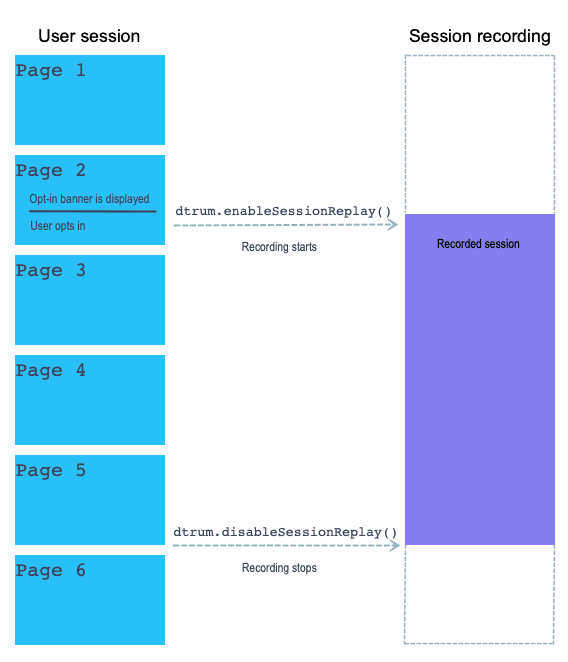
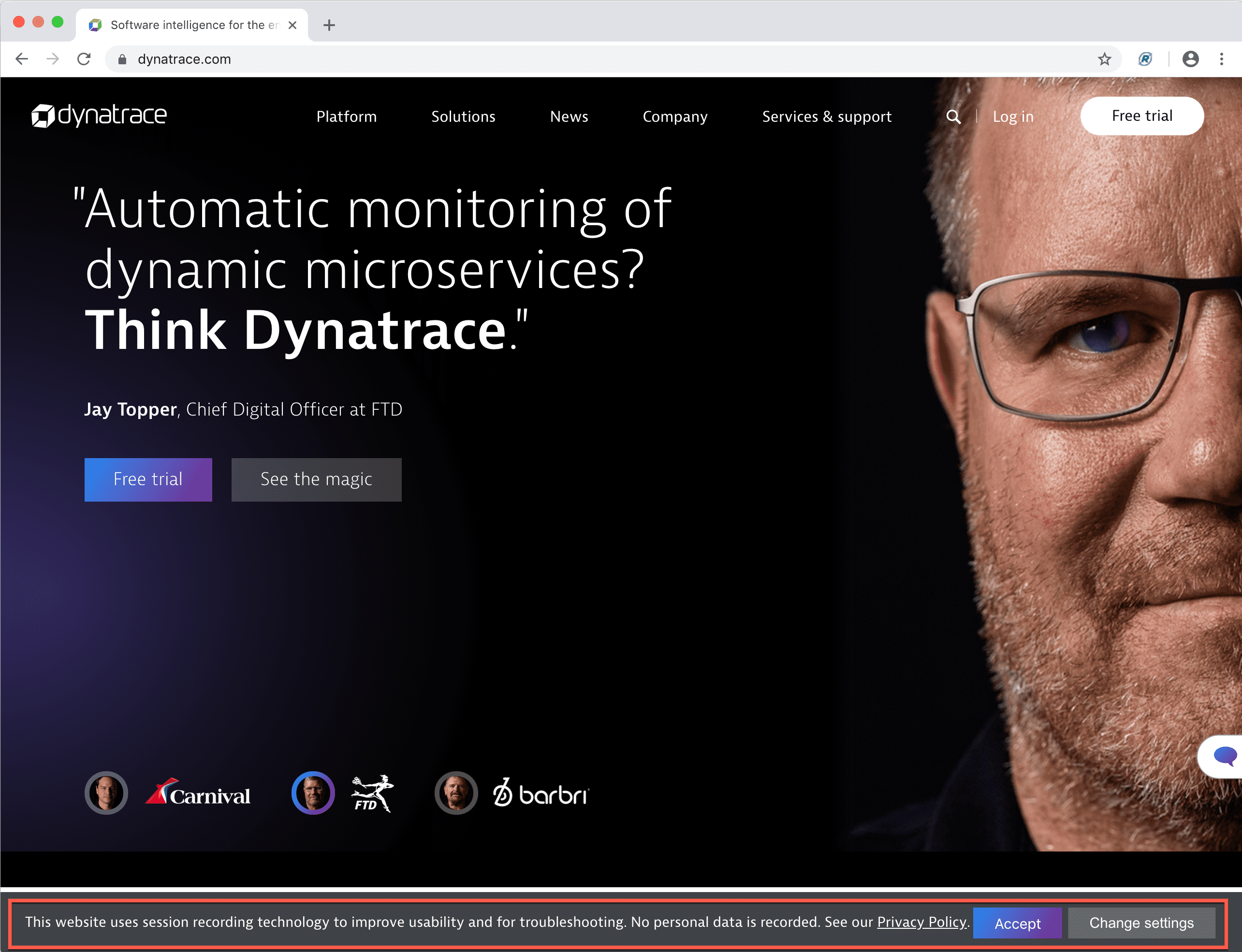
In such cases, you can display a consent banner to activate session recording when the user lands on Page 2 (see the callout at the bottom of the following image). When the user selects Accept to allow session recording, the application responds by invoking the dtrum.enableSessionReplay(ignoreCostControl: boolean) method and recording the session.
You can use a cookie in your application to record user content history within the browser. The content of this cookie is checked during each session to determine if the consent banner must be displayed. For example, if the cookie that stores the consent is named sessionReplayConsent, the application flow would be something like this:
- The application checks the value of the
sessionReplayConsentcookie. - If the value is
true, thedtrum.enableSessionReplay(ignoreCostControl: boolean) call is invoked. - If the value is
false, the consent banner is displayed. - If the user provides their consent, the
dtrum.enableSessionReplay(ignoreCostControl: boolean) call is invoked. - User consent is written to the
sessionReplayConsentcookie.
With this cookie, Session Replay continues to remain active until Page 5 of the application.
Once the user leaves Page 5, you can use the dtrum.disableSessionReplay() method to stop recording the session. Then, you must remove the cookie that has been used to store the consent.
You can use the JavaScript methods used for activating and deactivating Session Replay without displaying a banner to obtain consent. For example, if you wish to record a session each time any user logs in, you can use the dtrum.enableSessionReplay(ignoreCostControl: boolean) method to start recording and the dtrum.disableSessionReplay() method to stop recording following successful logout. This gives you complete control over the start and stop of Session Replay.
Activate Session Replay opt-in mode
Session Replay opt-in mode is deactivated by default.
To activate Session Replay opt-in mode
- Go to Web.
- Select the application that you want to configure.
- In the upper-right corner of the application overview page, select More (…) > Edit.
- From the application settings, select General settings > Data privacy > Session Replay.
- Turn on Enable opt-in mode for Session Replay.
With these configuration settings, Session Replay is inactive in your end users' browsers, and sessions are not recorded until the dtrum.enableSessionReplay(ignoreCostControl: boolean) method is called from the application.
If you choose not to Enable opt-in mode for Session Replay, all user sessions are recorded from the beginning until dtrum.disableSessionReplay() is called from the application.