Adjust Apdex settings for web applications in RUM Classic
- Dynatrace Classic
- How-to guide
- 1-min read
Apdex is an important score that measures your application performance. You can adjust the Apdex thresholds (Satisfactory, Tolerable, and Frustrating) for your application and for its key user actions to refine the Apdex calculations.
The Apdex rating that is displayed for your application for a certain period of time in Applications may differ from what is displayed for the same application and the same period of time in Data Explorer with the selected Apdex (by geolocation, user type) [web] metric.
As a workaround, you can manually implement the standard Apdex calculation using the formula:
(((builtin:apps.web.actionCount.category:filter(and(or(eq("Apdex category",SATISFIED)),or(in("dt.entity.application",entitySelector("type(application)"))))):splitBy("dt.entity.application"):names:sort(dimension("dt.entity.application.name",descending)):limit(20))+((builtin:apps.web.actionCount.category:filter(and(or(in("dt.entity.application",entitySelector("type(application)"))),or(eq("Apdex category",TOLERATING)))):splitBy("dt.entity.application"):names:sort(dimension("dt.entity.application.name",descending)):limit(20))/2)) / (builtin:apps.web.actionCount.category:filter(and(or(in("dt.entity.application",entitySelector("type(application)"))))):splitBy("dt.entity.application"):names:sort(dimension("dt.entity.application.name",descending)):limit(20))):sort(dimension("dt.entity.application.name",descending))
Configure Apdex settings for your application
-
Go to Web.
-
Select the application that you want to configure.
-
In the upper-right corner of the application overview page, select More (…) > Edit.
-
Select General settings > Load actions / XHR actions /Custom actions.
-
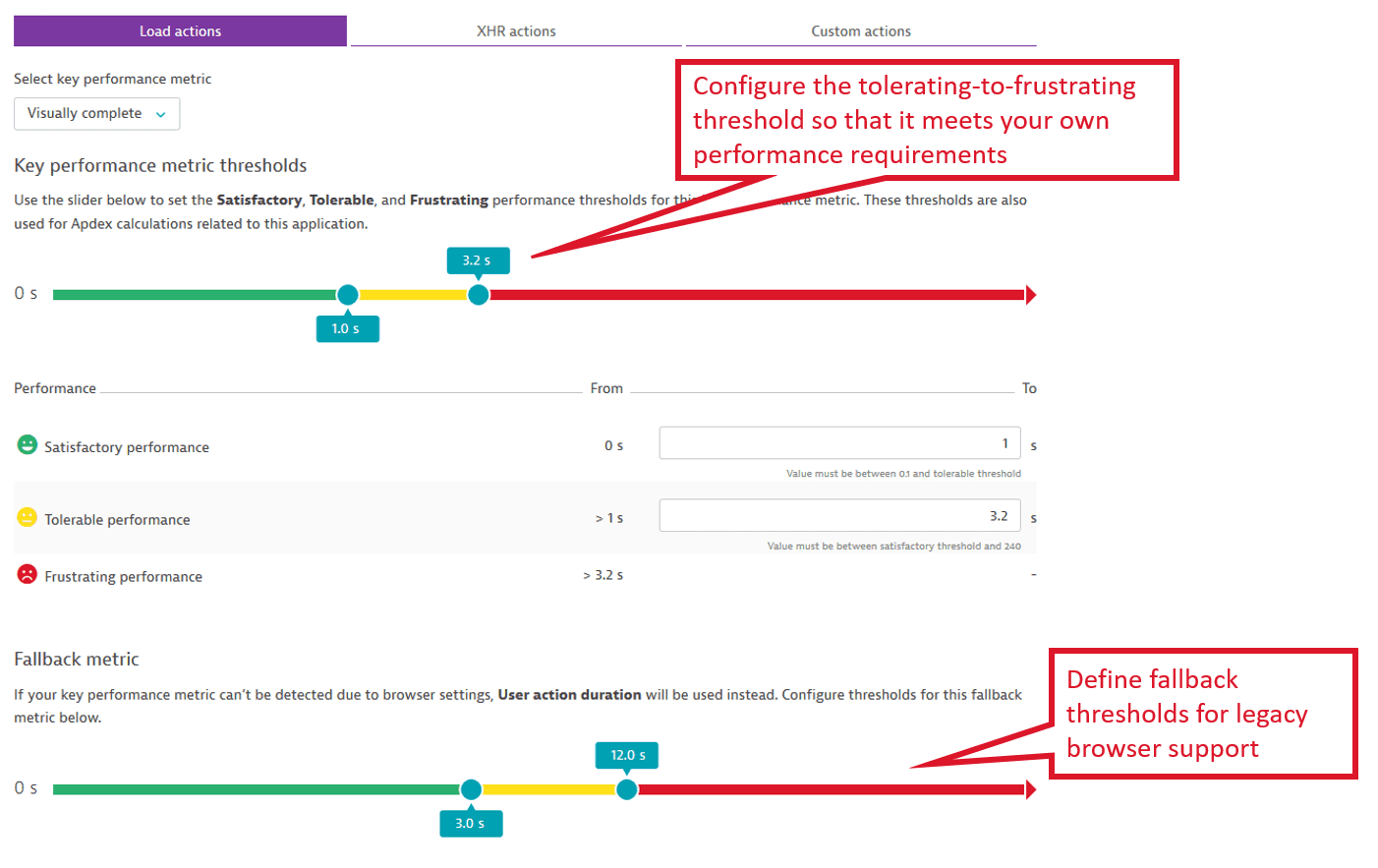
Use the sliders under Key performance metric thresholds to select the values that determine a user action as Satisfactory, Tolerable, and Frustrating.
-
Under Load actions and XHR actions, use the dropdown list to select the key performance metric that should be used for Apdex calculation.
Configure Apdex thresholds for key user actions
To change the Apdex thresholds for a key user action
- Go to Frontend.
- Select the application and scroll down to Top 3 user actions or Top 3 actions.
- Select View full details or Analyze performance.
- Search for the required key user action and select it.
The user action detail page opens. - In the upper-right corner of the user action detail page, do one of the following:
- For web applications, select More (…) > Edit > Key performance metric.
- For mobile and custom applications, select (Expand) > Edit > Key performance metric.
- Use the slider to adjust the Apdex thresholds.