Get business events from logs and spans
- Latest Dynatrace
- How-to guide
- Published May 14, 2026
Leverage logs and spans as additional sources for business events in Dynatrace by using OpenPipeline processing to extract business data.
Log to business events
Use OpenPipeline to convert incoming logs to business events. This is useful if logs contain business-relevant information or no other ingest path for business events is available.
See the following log example to get started:
{"content": "{\"user\": \"009494\", \"ordervalue\": 1000}"}
- Go to
 Settings > Process and contextualize > OpenPipeline > Logs.
 - Go to the Pipelines tab. You can have multiple pipelines. Select the one that is used to take your loglines into processing.
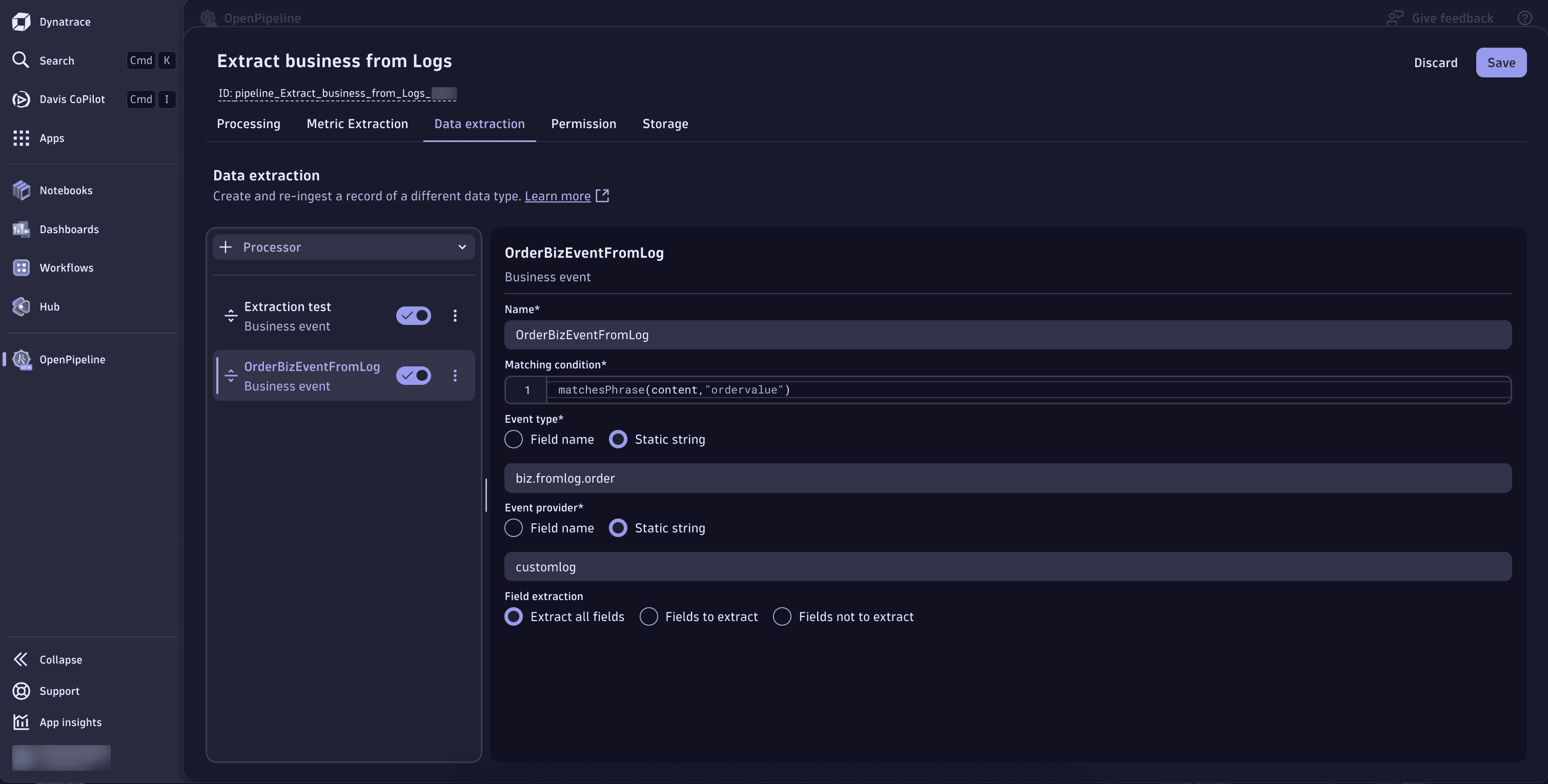
- Go to Data extraction > > Business event to add a new processor.
- Fill out the fields with the following data:
- Name:
OrderBizEventFromLog. - Matching condition:
matchesPhrase(content,"ordervalue"). - Define Event type as Static string and enter:
biz.fromlog.order. - Define Event provider as Static string and enter:
customlog. - Set Field extraction to the fields that should be extracted: Extract all fields.
- Name:
- Select Save.
Span to business events
You can convert incoming spans into business events with OpenPipeline. You can either start from a simple JSON representation of a span or from OTLP/HTTP JSON payload and then configure a pipeline and dynamic routing to create business events from those spans.
See the OTLP/HTTP JSON mapping example:
{"trace.id": "d34781d7d5410cb951b48cb3a5a84e92","span.id": "22b965cf82ff7ff5","start_time": "2026-04-01T11:05:42.077219000+01:00","end_time": "2026-04-01T11:05:42.079489000+01:00","service.name": "payment.service","span.name": "POST /payment.CardService/ValidateCard","code.function": "validateCreditCard","duration": "2270000","http.response.status_code": "200","app.user.id": "218c0f83-df6b-4ad8-8493-08354d85a476","app.cart.items.count": "0","url.path": "/payment.CardService/ValidateCard","http.route": "/payment.CardService/ValidateCard","telemetry.sdk.name": "opentelemetry","span.events": [{"span_event.name": "Validate card request received","timestamp": "2026-04-01T11:05:42.078927600+01:00"},{"span_event.name": "Call to card-issuer","timestamp": "2026-04-01T11:05:42.079100000+01:00"}],"dt.openpipeline.source": "/api/v2/otlp/v1/traces"}
To match the use case described above configure your dynamic routing with the following example.
Configure the pipeline for your spans the same way as for logs:
- Go to Settings > Process and contextualize > OpenPipeline > Spans.
- Go to the Pipelines tab and select the pipeline that is used to process your incoming spans.
- Go to Data extraction > > Business event to add a new processor.
- Fill out the fields with the following data:
- Name:
CardValidationBizEventFromSpan. - Matching condition:
matchesPhrase(code.function,"validateCreditCard"). - Define Event type as Static string and enter:
biz.fromspan.cardvalidation. - Define Event provider as Static string and enter:
payment.service. - Set Field extraction to the fields that should be extracted: Extract all fields.
- Select Save.
Once the pipeline processor is in place, configure dynamic routing to direct the right spans into that pipeline:
- Go to Settings > Process and contextualize > OpenPipeline > Spans.
- Go to the Dynamic routing tab and select Dynamic route to create a new one:
- Name:
Credit Card Validation. - Matching condition:
matchesPhrase (service.name, “payment.service”). - Pipeline: Select the pipeline where the span is being captured:
Credit Card Validation.
- Name:
When spans are captured by OneAgent, span-level request attributes are available and can be mapped as data fields. This lets you add extra business context, for example, customer IDs or order values to the generated business events.
For OTLP spans, you can use span attributes in the same way—map these attributes to data fields in the business event processor, under Data extraction to enrich the resulting business events with additional context.