Message queues
- Dynatrace Classic
- Explanation
- 4-min read
Message queues in the form of a queue or a topic provide lightweight storage for messages. They offer endpoints that allow applications to send messages to them and endpoints that allow applications to retrieve messages from them asynchronously or to subscribe to topics. For full details, see Queue concepts.
Decoupled services are standard in applications built with microservices, and events are used to communicate between services, making it essential to observe the performance of message queues. With Dynatrace, you can get full observability into your producer and consumer services and simplify troubleshooting in asynchronous communication flows.
Queue concepts
Learn the most important concepts of queue monitoring.
Configuration
Configure monitoring, tracing for IBM MQ, tags, and management zones.
Analysis
Analyze queues and topics in your environment.
Queues and topics in Dynatrace
OneAgent automatically detects queues and topics as part of distributed traces when monitored applications use the endpoints of compatible messaging clients to send or retrieve messages. To check the compatible clients, see Technology support.
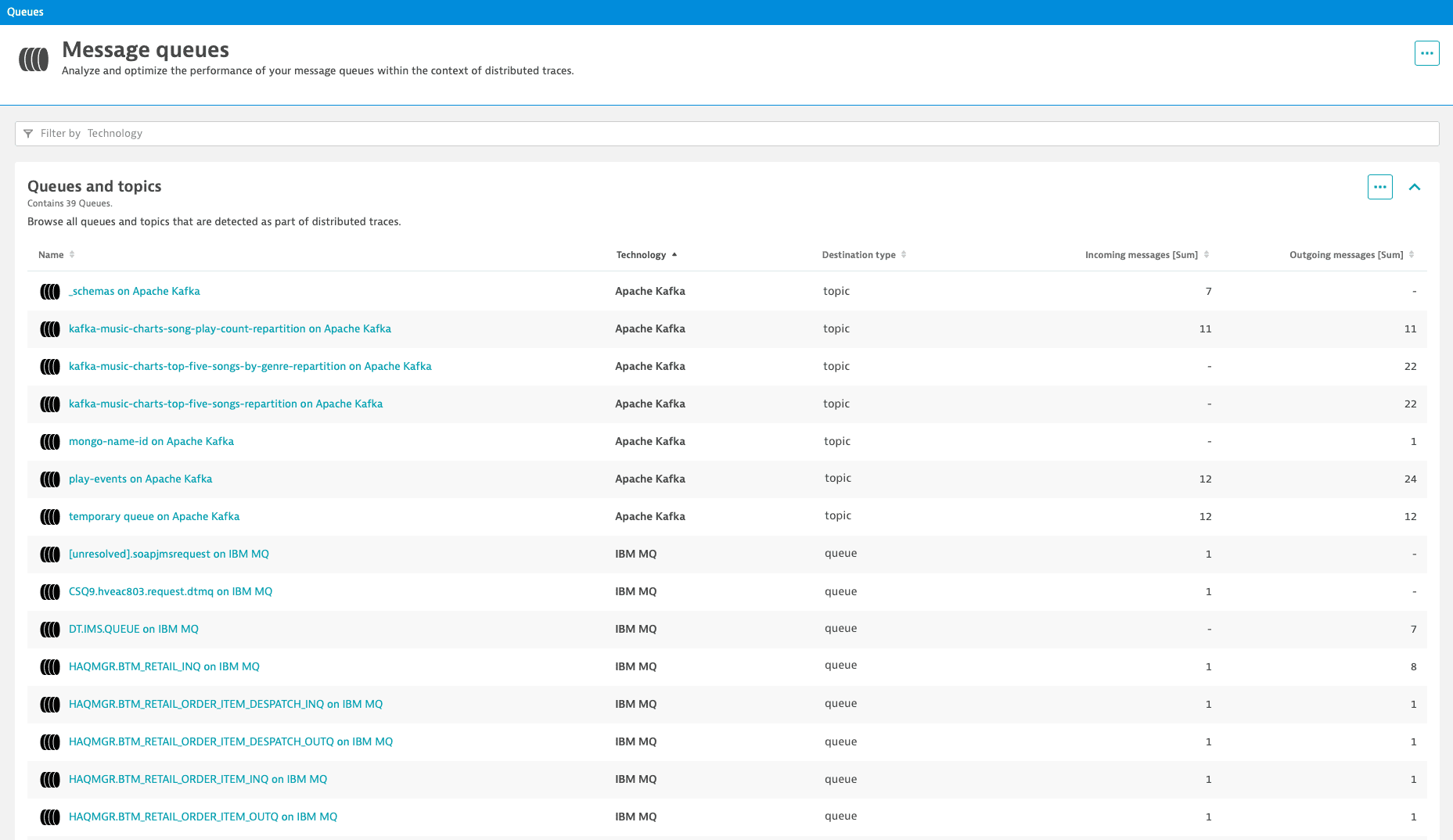
To get an overview of all detected queues and topics, go to Message Queues.
-
For all queues and topics, OneAgent measures the number of Incoming messages and Outgoing messages.
By monitoring these metrics, you can catch unbalanced message processing that could result in severe problems (such as queue overflows) and prevent them by scaling queues quickly or maintaining failover processes. -
Select the Name of a specific queue or topic to display its analytic view, with enhanced troubleshooting capabilities to gain additional insight into related anomalies.
Extensions
FAQ
What is the difference between a queue and a topic?
- Queue: a single message is retrieved by exactly one consumer (point-to-point model) even when more consumers are connected to the queue.
- Topic: a single message is published to all subscribers of that topic (publish-subscribe model).
In Dynatrace, both a queue and a topic result in a Queue entity.
Is a specific license required for OneAgent to detect queues and topics?
No. Queues and topics are detected as part of distributed traces when OneAgent is running in Full-Stack Monitoring mode.
Can OneAgent detect queues and topics in Infrastructure Monitoring mode?
No. Queues and topics are detected as part of distributed traces only when OneAgent is running in Full-Stack Monitoring mode.
When are queues and topics visible?
After queues and topics are detected by OneAgent on the messaging client-side, the Queues and topics table lists the ones that are part of distributed traces. Keep in mind that all queues and topics might not be used by the monitored applications or be accessed by OneAgent.
Can Dynatrace extensions detect queues and topics?
Yes, but the queues and topics detected by Dynatrace extensions don't result in Queue entities in your environment. Extensions can only add technology-specific metrics to Queue entities created by OneAgent. This is why queues and topics detected by extensions aren't visible in the Queues and topics table.
Why is there sometimes a difference between the number of queues or topics detected by OneAgent and by Dynatrace extensions?
While Dynatrace extensions detect queues and topics on the messaging server side, OneAgent detects them exclusively on the messaging client side. Additionally, not all queues and topics might be used by the monitored application or be accessed by OneAgent.
Why are the numbers of incoming and outgoing messages sometimes lower in Dynatrace?
The numbers of incoming and outgoing messages per queue or topic are calculated based on the data provided by monitored producer and consumer services. If a producer or consumer service is not monitored, the number of messages per queue or topic could be lower in Dynatrace than the actual number of processed messages.
Why are certain permanent queues or topics marked as temporary?
If a queue name or topic name contains four consecutive digits, Dynatrace automatically considers it to be a temporary queue or topic. For example, the queue name A4214QA contains four consecutive digits (4214), which will result in a temporary queue.
Dynatrace applies this logic to prevent monitoring of too many queues or topics. If this limit presents a problem in your environment, you can request an increase from four consecutive digits. To do so, Please contact a Dynatrace product expert via live chat within your environment.
Which messaging clients are compatible with OneAgent?
OneAgent supports various messaging clients. To find out the compatible clients, see Technology support.
Why is my ActiveMQ broker not detected?
The ActiveMQ transport configuration of a broker with the IP address 0.0.0.0 is not supported.
This configuration allows the broker to accept incoming messages on all network interfaces, while a broker IP address configured on a specific network interface is required for Dynatrace to establish a connection between the broker and its queues and to capture related metrics.
How can I define an automatically applied tag for queue entities?
Visit the related section on the Tags and management zone page.
How can I add queue entities to existing management zones?
Visit the related section on the Tags and management zone page.
 Message Queues