Capture request attributes based on method arguments
- Latest Dynatrace
- 6-min read
Dynatrace allows you to create request attributes based on method arguments.
Create request attributes
To create a request attribute based on a method argument
-
Go to
 Settings > Collect and capture > Distributed tracing > Service request attributes.
-
Select Define a new request attribute.
-
Provide a unique Request attribute name. You can rename an attribute at any point in the future.
-
Select Add new data source.
-
Optional Define the scope of the request attribute.
-
From the Request attribute source list, select Java method parameter(s), .NET method parameter(s), or PHP method parameter(s).
-
Select the Select method sources button to open the class wizard. Here you can select the class of the method upon whose argument you want to set an attribute.
-
Select the process group that contains the classes or interfaces you’re interested in and select Continue.
-
Search for the class that includes the method you’re interested in. Begin typing the class name and select Search button. The list may take a few seconds to populate.
-
Select a class from the displayed list. If the list doesn’t contain the class you’re looking for, refine the search string.
 Request attributes .NET
-
Finally, select one or more methods that you want to capture parameters from and then select Finish.
-
The methods you selected are listed in the method argument capture rule (see below). For each method, from the list box under Capture, select the argument or return value of the method you want to capture.
 Request attributes .NET
-
You can always extend the list or remove methods later. Once saved, restart the processes that this rule applies to.
Notes
- In addition to arguments and return values of any method, you can also capture the number of occurrences. You should only use a single method rule when capturing occurrences. Dynatrace will count the number of calls of this method within a single request.
- You can capture non-primitive and non-string objects. This can, however, result in increased performance overhead. Some objects may inadvertently change their state based on the method called, so use this option with caution.
- Core Java classes (for example,
javax.andjava.) or .NET classes (for example,System.) produce the warning Not instrumentable. These classes can't be used, because instrumenting them would mean instrumenting a substantial part of your environment. - A method argument rule doesn't start a trace. Values are captured only when the method runs within a request that Dynatrace already traces, such as an incoming web request or a custom service.
- For .NET, some values are captured differently with Advanced .NET Instrumentation Mode. See .NET methods with Advanced .NET Instrumentation Mode.
What's next?
Once your services begin calling the respective methods, you should see the request attribute appear on the distributed traces page.
The code-level tree view also contains these methods. This view tells you what the value was on each specific method—in case the method is called multiple times with different values.
Post processing
In most cases, a captured value will contain what it is you’re looking for. However, you may not want an entire value, or even every value. With post processing you can manipulate the captured value.
Expand the Optionally restrict or process the captured parameter(s) further option to see the processing steps. The steps are executed in the presented order—each step is applied to the result of the previous step.
You don't have to apply all the steps. Each step becomes active once you provide a value for it or select the option box.
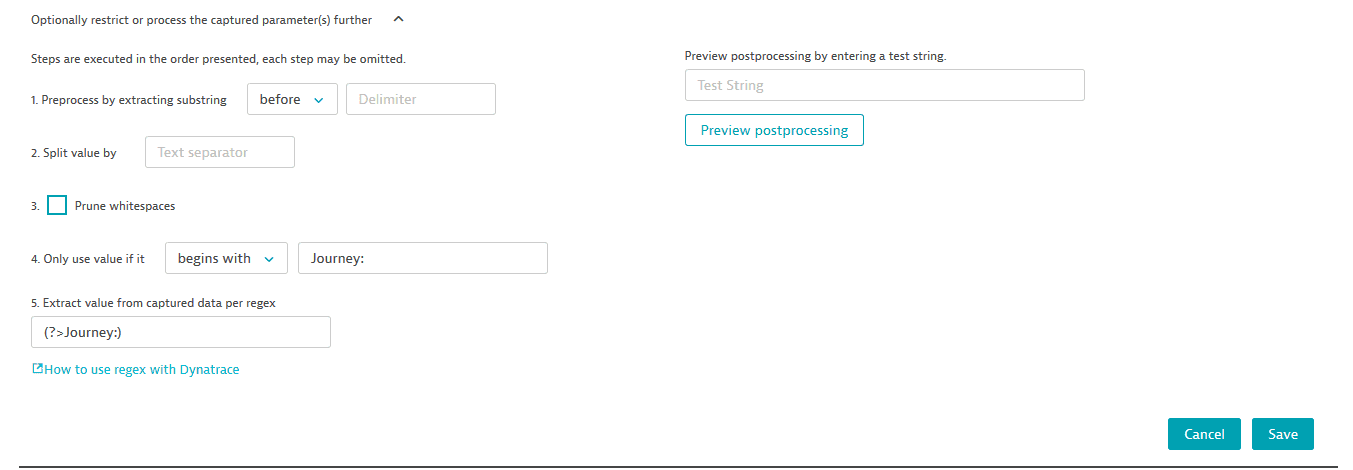
Step 1 enables you to extract something from the resulting string based on delimited characters.
Step 2 can split the captured value into several values based on a delimited character.
Step 3 removes whitespaces.
Step 4 enables you to filter out captured values that don't fit the provided criterion.
Step 5 enables you to extract something from the resulting string based a regular expression.
Numerical values and aggregations
You might want to capture an argument of a method and the method is called multiple times. Sometimes you’re only interested in a specific value. In other cases, you may only want to count the executions or average the captured values. Within other values, the argument in question may be a complex object and you’re really only interested in one aspect of the object.
To tackle such situations, you can use the Data type and the Aggregation on request options when you define or configure a request attribute.
Aggregations
Aggregation is applied not only within a single data source (for example, a method rule) but also across multiple data sources. The order is defined by:
- Order of the data source rules
- Order of the method rules within a method data source
- Order of the method executions in your application (when a method is executed multiple times)
Text attributes
For text attributes, you can choose between these options:
- First occurrence
- Last occurrence
- Set of distinct values
The Set of distinct values option enables you to use all distinct values found in a request for filtering. For example, if a request captures a request attribute called Product and two values are captured for this attribute, Book and Video. You can filter by either of these values to find the request in question.
Numeric attributes
For numeric values, you can use the following aggregations:
- Minimum of captured values
- Maximum of captured values
- Average of captured values
- Sum of captured values
- Count occurrences
- Count distinct
If you choose one of these options, the data type changes to integer automatically. These settings are useful when you’re counting something.
Deep object access
A value that you’re interested in may not be available as a simple argument, but rather as part of a complex argument object or even a member variable of a class you’re looking at. Such values can still be accessed. You can access not only argument values and return values, but also an object itself. Whenever an item to be captured (be it an argument or an object) is a complex object, you have the ability to define a method (chain) that enables deep access into the object. The example below uses the method getBookingCode. You can even execute a chain, for example, getBookingCode().getCustomerCode().
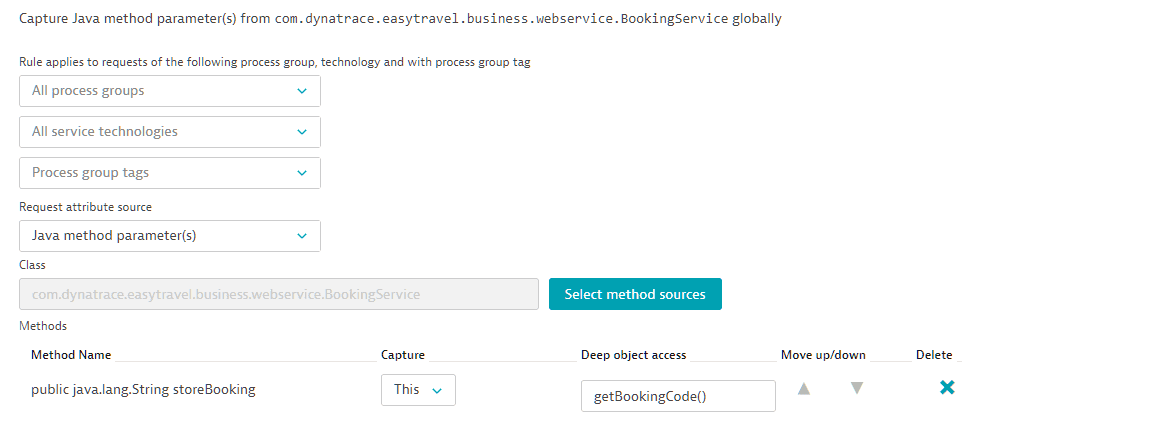
The deep object access feature introduces new code into your application that must be executed. As such, it may change the state of your application or introduce performance impact. Use this feature with caution.
Limitations
The following limitations apply to deep object access:
- You can access only one field at a time. If you're accessing a field, it must be in the beginning of the chain.
- Method parameters are not allowed.
- You must use valid Java, .NET, or PHP notation.
.NET methods with Advanced .NET Instrumentation Mode
With Advanced .NET Instrumentation Mode, OneAgent captures the return values of asynchronous methods and the values of out and ref arguments differently. If you enable the mode for processes that already have request attributes, the captured values change in the following cases.
| Captured value | Without Advanced .NET Instrumentation Mode | With Advanced .NET Instrumentation Mode |
|---|---|---|
Return value of a method that returns Task<T> or ValueTask<T> | The returned task itself, when the method returns | The result of the task, when the task completes successfully |
| Return value of a method whose task fails or is canceled | The returned task itself | No value |
Return value of a method that returns Task or ValueTask | The returned task itself | No value |
Deep object access on the return value of a Task<T> or ValueTask<T> method | Applied to the task | Applied to the result of the task |
out argument | The value before the call, usually the default value | The value that the method assigns |
ref argument | The value before the call | The value after the call |
out or ref argument of a call that throws an exception | The value before the call | No value |
All other values are captured the same way in both modes.
Asynchronous methods
With Advanced .NET Instrumentation Mode, OneAgent treats every method that returns Task, Task<T>, ValueTask, or ValueTask<T> as asynchronous, whether or not it uses async and await. For these methods:
- OneAgent reports the captured values of a call when the returned task completes. If the task never completes, no values are reported for that call.
- The caller can get a different task object than the one the method created. It completes after the original task. Code that relies on the identity or the concrete type of the returned task, such as a reference comparison or a cast from
TasktoTask<T>, can behave differently.