Calculate your consumption of Events - Retain (DPS)
- Latest Dynatrace
- Explanation
- 5-min read
This page describes how the Events - Retain DPS capability is consumed and billed. For an overview of the capability, including its main features, see Events - Retain.
The usage of  Distributed Tracing and
  Services is included with Dynatrace.
No consumption is generated by these apps.
Services is included with Dynatrace.
No consumption is generated by these apps.
How consumption is calculated: GiB-day
Retained data is the amount of data saved to storage after data parsing, enrichment, transformation, and filtering but before compression. It is calculated per gibibyte-day (GiB-day).
For data in the Grail Resource Store, such as lookup tables:
-
A minimum file size of 1 MiB is used for Events - Retain calculations.
-
Each time you upload or save a file, a minimum of one day of Events - Retain is charged. This includes:
- Files that are uploaded and deleted within 24 hours.
- File uploads that overwrite an existing file. For example: if you overwrite a single file every hour, you will be charged one day of Events - Retain for each of the 24 versions; if you overwrite a single file every six hours, you will be charged one day of Events - Retain for each of the four versions.
-
Events - Retain usage is calculated using hourly time windows based on the currently stored data volume.
Calculate your consumption
Apply the following calculation to determine your consumption for the Retain data-usage dimension:
(number of GiB of processed data ingested per day) × (retention period in days) × (GiB-day price as per your rate card) × (number of days that data is stored) = consumption in your local currency
-
retention period in daysis based on the retention-period of the storage bucket under analysis. (For example, 35 days if you're analyzing thedefault_logsbucket.) -
number of days data is storedreflects the period during which the data is stored. (For example, 30 days if you're analyzing the monthly cost, or 365 days for a full year.)
If you retain the ingested 5 GiB of event data, a total of 9 GiB of enriched data is added to storage (5 GiB times an enrichment factor of 1.8).
If you ingest an additional 5 GiB of data per day (i.e., 9 GiB after enrichment), for a total of 35 days, consumption for Retain (after the 35th day) is calculated as follows:
- Retain volume per day:
5 GiB * 1.8 = 9 GiB - Total retain volume (after 35 days):
9 GiB * 35 days = 315 GiB - Cost per day (after 35 days):
315 GiB * (Retain price as per your rate card) = Cost - Cost per year (after 35 days):
315 GiB * 365 * (Retain price as per your rate card) = Cost
Track your consumption
This section describes the different Dynatrace tools that you can use to track consumption and costs.
Track your consumption with DQL queries
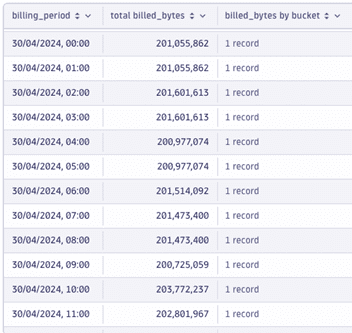
The following DQL query provides the hourly Retain usage by bucket
fetch dt.system.events| filter event.kind == "BILLING_USAGE_EVENT" and in(event.type, {"Events - Retain", "Files - Retain"})| fieldsAdd usage.bucket = if(event.type == "Files - Retain", "Files", else: coalesce(usage.bucket, usage.event_bucket))| summarize {usage.bucket = takeLast(usage.bucket), billed_bytes = takeLast(billed_bytes)}, by:{billing_period = bin(timestamp, 1h), event.id}| fieldsAdd bytes_and_bucket = record(bucket = usage.bucket, billed_bytes = billed_bytes)| summarize {`total billed_bytes` = sum(billed_bytes), `billed_bytes by bucket` = collectArray(bytes_and_bucket)}, by:{billing_period}| fields billing_period, `total billed_bytes`, `billed_bytes by bucket`
The example below shows the hourly usage by bucket visualized in a nested table view
Track your consumption and costs in Account Management
Your Dynatrace Platform Subscription provides daily updates about accrued usage and related costs. You can access these details anytime via Account Management (Subscription > Overview > Cost and usage details > Events – Retain > Actions > View details) or the Dynatrace Platform Subscription API.
On the Capability cost and usage analysis page, select a specific environment to analyze that environment’s cost and usage for a specific capability.
Track your consumption and costs via API
You can query metrics via the Environment API - Metrics API v2.