Azure Cosmos DB Account (GlobalDocumentDB) monitoring
- Dynatrace Classic
- How-to guide
- 9-min read
For information about differences between classic services and other services, see Migrate from Azure classic (formerly 'built-in') services to cloud services.
Dynatrace ingests metrics from Azure Metrics API for Azure Cosmos DB Account (GlobalDocumentDB). You can view metrics for each service instance, split metrics into multiple dimensions, and create custom charts that you can pin to your dashboards.
Prerequisites
- Dynatrace version 1.199+
- Environment ActiveGate version 1.195+
Enable monitoring
To learn how to enable service monitoring, see Enable service monitoring.
View service metrics
You can view the service metrics in your Dynatrace environment either on the custom device overview page or on your Dashboards page.
View metrics on the custom device overview page
To access the custom device overview page
- Go to
 Technologies & Processes Classic.
 - Filter by service name and select the relevant custom device group.
- Once you select the custom device group, you're on the custom device group overview page.
- The custom device group overview page lists all instances (custom devices) belonging to the group. Select an instance to view the custom device overview page.
View metrics on your dashboard
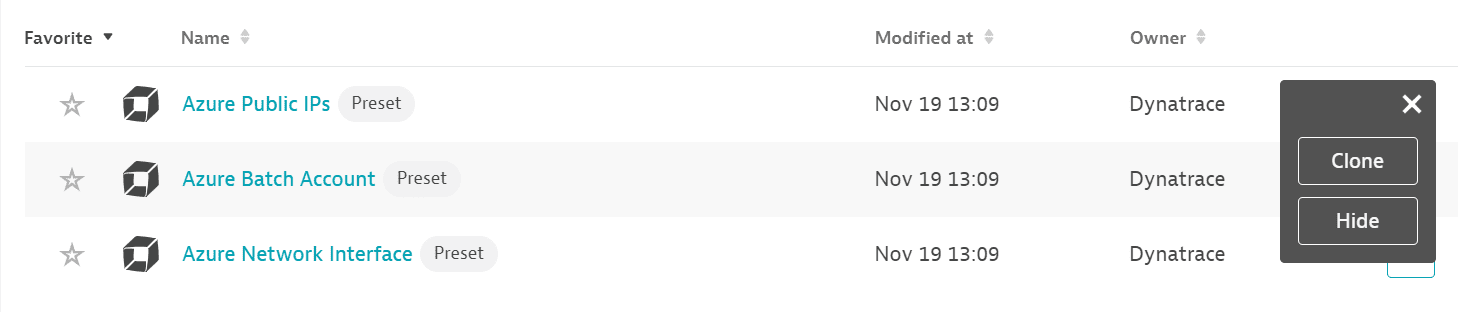
If the service has a preset dashboard, you'll get a preset dashboard for the respective service containing all recommended metrics on your Dashboards page. You can look for specific dashboards by filtering by Preset and then by Name.
For existing monitored services, you might need to resave your credentials for the preset dashboard to appear on the Dashboards page. To resave your credentials, go to Settings > Cloud and virtualization > Azure, select the desired Azure instance, then select Save.
You can't make changes on a preset dashboard directly, but you can clone and edit it. To clone a dashboard, open the browse menu (…) and select Clone.
To remove a dashboard from the dashboards list, you can hide it. To hide a dashboard, open the browse menu (…) and select Hide.
Hiding a dashboard doesn't affect other users.
Available metrics
This service monitors a part of Azure Cosmos DB Account (Microsoft.DocumentDB/databaseAccounts). While you have this service configured, you can't have Azure Cosmos Database (built-in) service turned on.
| Name | Description | Dimensions | Unit | Recommended |
|---|---|---|---|---|
Region added | Region Added | Region | Count | |
Autoscale max throughput | Autoscale Max Throughput | Collection name, Database name | Count |
|
Cassandra connection closures | Number of Cassandra connections that were closed, reported at a 1 minute granularity | Closure reason, Region | Count | |
Cassandra connector average replication latency | Cassandra Connector Average ReplicationLatency | MilliSecond | ||
Cassandra connector replication health status | Cassandra Connector Replication Health Status | Replication in error, Replication not started, Replication in progress | Count | |
Cassandra keyspace created | Cassandra Keyspace Created | Keyspace name | Count | |
Cassandra keyspace deleted | Cassandra Keyspace Deleted | Keyspace name | Count | |
Cassandra keyspace throughput updated | Cassandra Keyspace Throughput Updated | Keyspace name | Count | |
Cassandra keyspace updated | Cassandra Keyspace Updated | Keyspace name | Count | |
Cassandra request charges | RUs consumed for Cassandra requests made | Collection name, Database name, Operation type, Region, Resource type | Count | |
Cassandra requests | Number of Cassandra requests made | Collection name, Database name, Error code, Operation type, Region, Resource type | Count | |
Cassandra table created | Cassandra Table Created | Table name, Keyspace name | Count | |
Cassandra table deleted | Cassandra Table Deleted | Table name, Keyspace name | Count | |
Cassandra table throughput updated | Cassandra Table Throughput Updated | Table name, Keyspace name | Count | |
Cassandra table updated | Cassandra Table Updated | Table name, Keyspace name | Count | |
Account created | Account Created | Count | ||
Data usage | Total data usage reported at 5 minutes granularity | Collection name, Database name, Region | Byte |
|
Dedicated gateway average CPU usage | Average CPU usage across dedicated gateway instances | Region | Percent | |
Dedicated gateway average memory usage | Average memory usage across dedicated gateway instances, which is used for both routing requests and caching data | Region | Byte | |
Dedicated gateway CPU usage | CPU usage across dedicated gateway instances | Region | Percent | |
Dedicated gateway maximum CPU usage | Average Maximum CPU usage across dedicated gateway instances | Region | Percent | |
Dedicated gateway memory usage | Memory usage across dedicated gateway instances | Region | Byte | |
Dedicated gateway requests | Requests at the dedicated gateway | Cache exercised, Cache hit, Collection name, Database name, Operation name, Region | Count | |
Account deleted | Account Deleted | Count | ||
Document count | Total document count reported at 5 minutes, 1 hour and 1 day granularity | Collection name, Database name, Region | Count |
|
Document quota | Total storage quota reported at 5 minutes granularity | Collection name, Database name, Region | Byte |
|
Gremlin database created | Gremlin Database Created | Database name | Count | |
Gremlin database deleted | Gremlin Database Deleted | Database name | Count | |
Gremlin database throughput updated | Gremlin Database Throughput Updated | Database name | Count | |
Gremlin database updated | Gremlin Database Updated | Database name | Count | |
Gremlin graph created | Gremlin Graph Created | Graph name, Database name | Count | |
Gremlin graph deleted | Gremlin Graph Deleted | Graph name, Database name | Count | |
Gremlin graph throughput updated | Gremlin Graph Throughput Updated | Graph name, Database name | Count | |
Gremlin graph updated | Gremlin Graph Updated | Graph name, Database name | Count | |
Gremlin request charges | Request Units consumed for Gremlin requests made | Collection name, Database name, Region | Count | |
Gremlin requests | Number of Gremlin requests made | Collection name, Database name, Error code, Region | Count | |
Index usage | Total index usage reported at 5 minutes granularity | Collection name, Database name, Region | Byte |
|
Integrated cache evicted entries size | Size of the entries evicted from the integrated cache | Region | Byte | |
Integrated cache item expiration count | Number of items evicted from the integrated cache due to TTL expiration | Region | Count | |
Integrated cache item hit rate | Number of point reads that used the integrated cache divided by number of point reads routed through the dedicated gateway with eventual consistency | Region | Percent | |
Integrated cache query expiration count | Number of queries evicted from the integrated cache due to TTL expiration | Region | Count | |
Integrated cache query hit rate | Number of queries that used the integrated cache divided by number of queries routed through the dedicated gateway with eventual consistency | Region | Percent | |
Materialized view catchup gap in minutes | Maximum time difference in minutes between data in source container and data propagated to materialized view | Region, Materialized view name | Count | |
Materialized views builder average CPU usage | Average CPU usage across materialized view builder instances, which are used for populating data in materialized views | Region | Percent | |
Materialized views builder average memory usage | Average memory usage across materialized view builder instances, which are used for populating data in materialized views | Region | Byte | |
Materialized views builder maximum CPU usage | Average Maximum CPU usage across materialized view builder instances, which are used for populating data in materialized views | Region | Percent | |
Metadata requests | Count of metadata requests. Cosmos DB maintains system metadata collection for each account, that allows you to enumerate collections, databases, etc, and their configurations, free of charge. | Collection name, Database name, Region, Status code | Count |
|
Normalized ru consumption | Max RU consumption percentage per minute | Collection name, Collection rid, Database name, Partition key range ID, Physical partition ID, Region | Percent |
|
Region offlined | Region Offlined | Region, Status code | Count | |
Region onlined | Region Onlined | Region, Status code | Count | |
Physical partition size | Physical Partition Size in bytes | Collection name, Database name, Resource ID, Physical partition ID, Region | Byte | |
Physical partition throughput | Physical Partition Throughput | Collection name, Database name, Resource ID, Physical partition ID, Region | Count | |
Provisioned throughput | Provisioned Throughput | Collection name, Database name | Count |
|
Region failed over | Region Failed Over | Count | ||
Region removed | Region Removed | Region | Count | |
P99 replication latency | P99 Replication Latency across source and target regions for geo-enabled account | Source region, Target region | MilliSecond | |
Server side latency | Server Side Latency | Collection name, Connection mode, Database name, Operation type, Publicapi type, Region | MilliSecond |
|
Server side latency direct | Server Side Latency in Direct Connection Mode | Collection name, Database name, Operation type, Publicapi type, Region | MilliSecond | |
Server side latency gateway | Server Side Latency in Gateway Connection Mode | Collection name, Database name, Operation type, Publicapi type, Region | MilliSecond | |
Service availability | Account requests availability at one hour, day or month granularity | Percent |
| |
SQL container created | Sql Container Created | Container name, Database name | Count | |
SQL container deleted | Sql Container Deleted | Container name, Database name | Count | |
SQL container throughput updated | Sql Container Throughput Updated | Container name, Database name | Count | |
SQL container updated | Sql Container Updated | Container name, Database name | Count | |
SQL database created | Sql Database Created | Database name | Count | |
SQL database deleted | Sql Database Deleted | Database name | Count | |
SQL database throughput updated | Sql Database Throughput Updated | Database name | Count | |
SQL database updated | Sql Database Updated | Database name | Count | |
Azure table table created | AzureTable Table Created | Table name | Count | |
Azure table table deleted | AzureTable Table Deleted | Table name | Count | |
Azure table table throughput updated | AzureTable Table Throughput Updated | Table name | Count | |
Azure table table updated | AzureTable Table Updated | Table name | Count | |
Total requests | Number of requests made | Capacity type, Collection name, Database name, Operation type, Region, Status, Status code | Count |
|
Total requests (preview) | Number of SQL requests | Collection name, Database name, Operation type, Region, Status, Status code | Count | |
Total request units | SQL Request Units consumed | Capacity type, Collection name, Database name, Operation type, Region, Status, Status code | Count |
|
Total request units (preview) | Request Units consumed with CapacityType | Capacity type, Collection name, Database name, Operation type, Region, Status, Status code | Count | |
Account keys updated | Account Keys Updated | Key type | Count | |
Account network settings updated | Account Network Settings Updated | Count | ||
Account replication settings updated | Account Replication Settings Updated | Count | ||
Account diagnostic settings updated | Account Diagnostic Settings Updated | Diagnostic settings name, Resource group name | Count |