Set up file-based endpoints and credentials
- Latest Dynatrace
- How-to guide
- 4-min read
- Published Aug 25, 2026
Keep sensitive data out of Dynatrace and rotate credentials without reconfiguring the extension. To do this, supply connection details through files mounted into the SQL Extension Executor pod rather than entering them directly in the monitoring configuration.
Configure file-based endpoints
Provide a JSON file containing the host, port, and any vendor-specific fields for your database. The file must be mounted into the SQL Extension Executor pod filesystem—a Kubernetes Secret is one common option, but any volume type works:
{"host": "<db-host>","port": 5432,"databaseName": "<db-name>","ssl": false}
The endpoint JSON schema may vary based on the extension version. For the latest example with all supported fields, download it from an existing monitoring configuration in your environment.
Configure file location
Once the file is mounted, specify its path in the extension endpoint configuration.
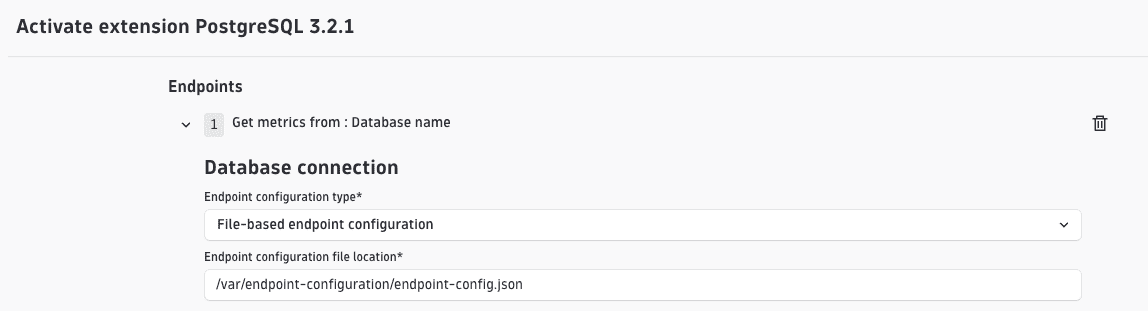
Configure file location via API
The same configuration can be applied through the API. When specifying the endpoints in your API call, set "configType": "file" and point endpointFile to the path where you mounted the file:
"endpoints": [{"configType": "file","endpointFile": "<path-to-mounted-json-file>","authentication": {"scheme": "basic","username": "<username>","password": "<password>"}}]
The authentication field must always be present in the monitoring configuration. You can use the standard approach (a basic scheme or credential vault reference), or switch to file-based authentication to keep credentials out of the configuration entirely. The file-based approach is described in the next section.
Changes to the endpoint configuration file are not applied automatically. To pick up the new values, either restart the SQL Extension Executor pod or modify the extension monitoring configuration.
Configure file-based authentication
Provide a JSON file containing your authentication details. The file must be mounted into the SQL Extension Executor pod filesystem—a Kubernetes Secret is one common option, but any volume type works:
{"scheme": "basic","username": "<username>","password": "<password>"}
Configure file location
Once the file is mounted, specify its path in the extension endpoint configuration.

Configure file location via API
The same configuration can be applied through the API. When specifying the endpoints in your API call, set "scheme": "file" and point authFile to the mounted credentials:
"endpoints": [{..."authentication": {"scheme": "file","authFile": "/var/auth-configuration/auth-data.json"},...}]
Credential auto-reload
When the Secret containing the authentication file is updated, the SQL Extension Executor automatically detects the change and reloads the credentials without restarting. You can rotate passwords with no downtime and no extension reconfiguration required.
Automatic reload requires Kubernetes to propagate Secret updates to the mounted volume. Volumes mounted using subPath are not updated automatically and won't trigger a reload.
Configure endpoint and authentication files
-
Mount both files into the SQL Extension Executor pod. The following example uses a Kubernetes Secret, but any volume type works.
apiVersion: v1kind: Secretmetadata:name: monitoring-configuration-datanamespace: dynatracestringData:auth-data.json: |{"scheme": "basic","username": "<username>","password": "<password>"}endpoint-config.json: |{"host": "<db-host>","port": 5432,"databaseName": "<db-name>","ssl": false} -
Mount the Secret in DynaKube.
spec:extensions:databases:- id: defaultreplicas: 1volumes:- name: monitoring-configuration-datasecret:secretName: monitoring-configuration-datavolumeMounts:- name: monitoring-configuration-datamountPath: /var/monitoring-configuration-datareadOnly: true
Once the files are mounted, reference both paths in the extension endpoint configuration.
Configure file locations
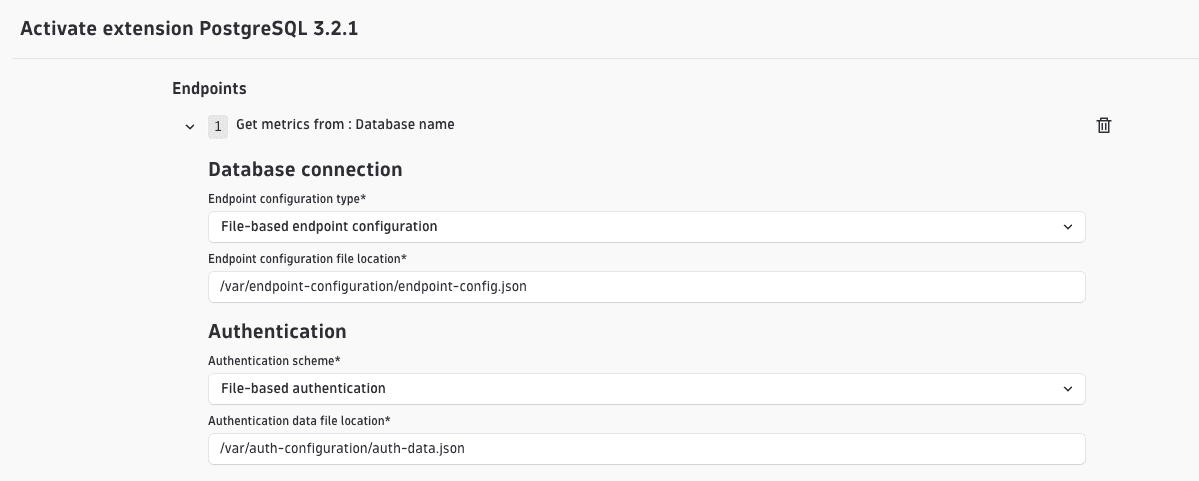
Configure file locations via API
The same configuration can be applied through the API. When specifying the endpoints in your API call:
"endpoints": [{"configType": "file","endpointFile": "/var/monitoring-configuration-data/endpoint-config.json","authentication": {"scheme": "file","authFile": "/var/monitoring-configuration-data/auth-data.json"}}]
 Extensions