Metadata
- Latest Dynatrace
- Reference
- 5-min read
- Published Jul 13, 2026
A grouped, searchable key-value list that fetches entity metadata via a DQL query and organizes it into collapsible accordion sections. Fields recognized by the built-in registry are automatically placed into the correct group (for example, Core, Kubernetes, Infrastructure). Fields not in the registry fall into the Others group. Use overrideMetadataRegistry to map custom or unrecognized fields into the right groups.
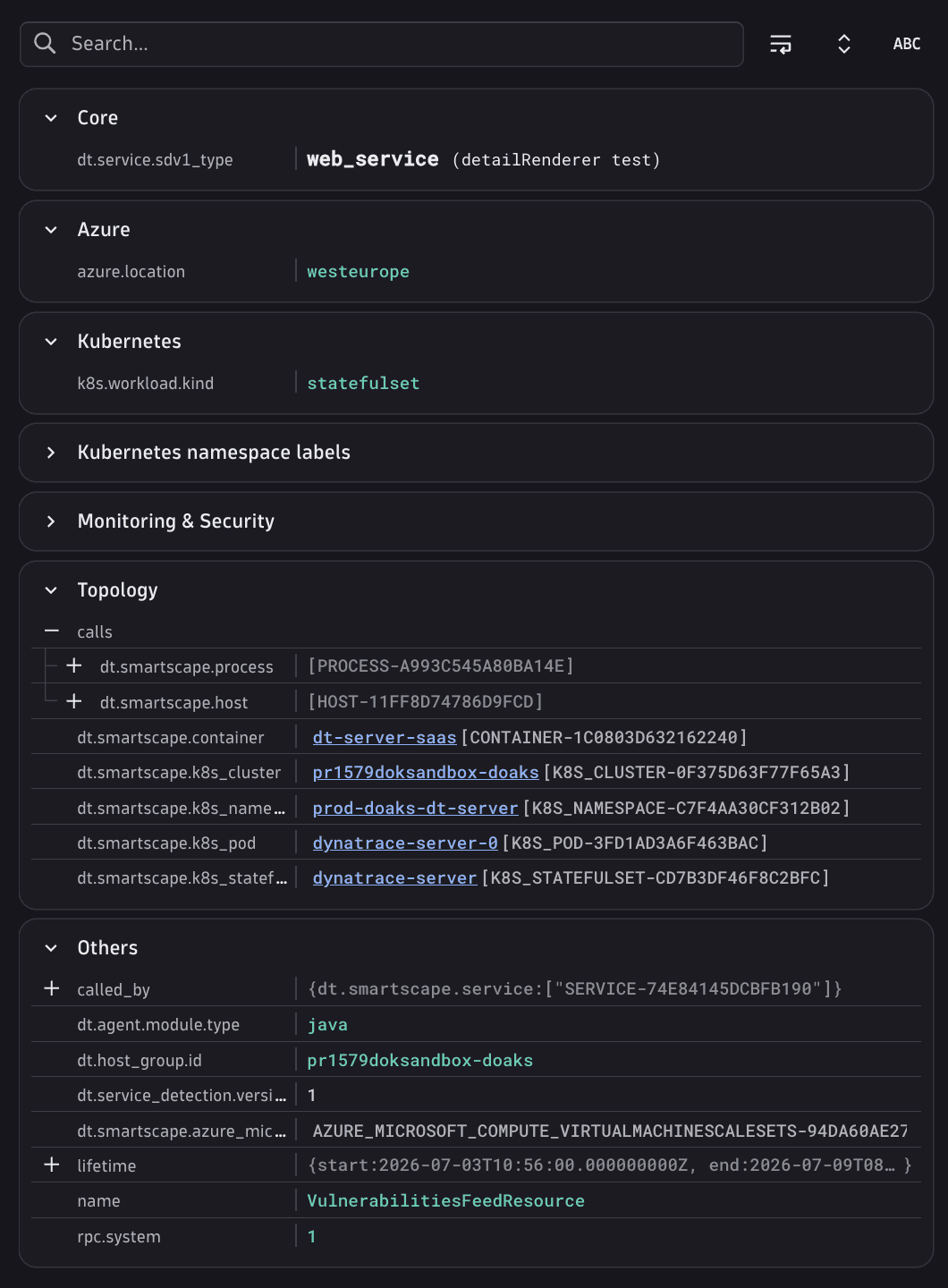
Placement: A metadata card is a leaf card, valid inside an Entity details tab and any layout that accepts a card. See Elements overview.
Fields
In addition to the shared CoreElement fields (see Elements overview):
| Property | Type | Description |
|---|---|---|
|
| DQL query used to fetch metadata fields. Supports DQL variables such as |
|
| Per-field overrides keyed by field name, layered onto the built-in field registry. Required to assign custom or unrecognized fields to a group other than |
|
| Actions applied to every cell in the key column. |
|
| Actions applied to every cell in the value column. |
|
| Description displayed below the card title. Used as a legend for a custom suffix. |
MetadataFieldConfig
Each entry in overrideMetadataRegistry is a MetadataFieldConfig. The registry entry is matched to the result of the dqlQuery result by the name field.
| Property | Type | Description |
|---|---|---|
|
| DQL field name. Defaults to the registry key. |
|
| Human-readable label shown in the key column. |
|
| Field type controlling how the value is rendered. Defaults to |
|
| Text suffix appended verbatim after the rendered value with no separator. Include a leading space if you want one (for example, |
|
| Groups this field is displayed under. Defaults to |
Known type values: 'string' (plain text, default), 'array' (each element as a subrow), 'entity_id' (clickable intent link), 'smartscape_id' (Smartscape entity intent link), 'timestamp' (formatted date/time), 'duration' (formatted duration), 'record' (fields expanded into subrows), 'tags' / 'tags:aws' / 'tags:k8s.annotations' / 'tags:k8s.labels' (tag chips, each variant targets the corresponding tag namespace).
Entity intent links

When a field's type is entity_id or smartscape_id, the value is rendered as a clickable intent link that opens the entity in the relevant app context. For this to work, the DQL query must return the entity ID as a plain string in the corresponding field:
entity_id: The field must contain a classic entity ID. InsmartscapeNodesqueries useid_classic; infetch dt.entity.*queries useiddirectly.smartscape_id: The field must contain a Smartscape entity ID. InsmartscapeNodesqueries useid; in entity queries usetoSmartscapeId(id).
These built-in navigation links are the only per-field intent mechanism. There is no way to attach a custom appId or intentId to an individual field value. Custom intents are available only via card-header actions (whole card) or valueCellActions (all value cells uniformly).
MetadataFieldGroup
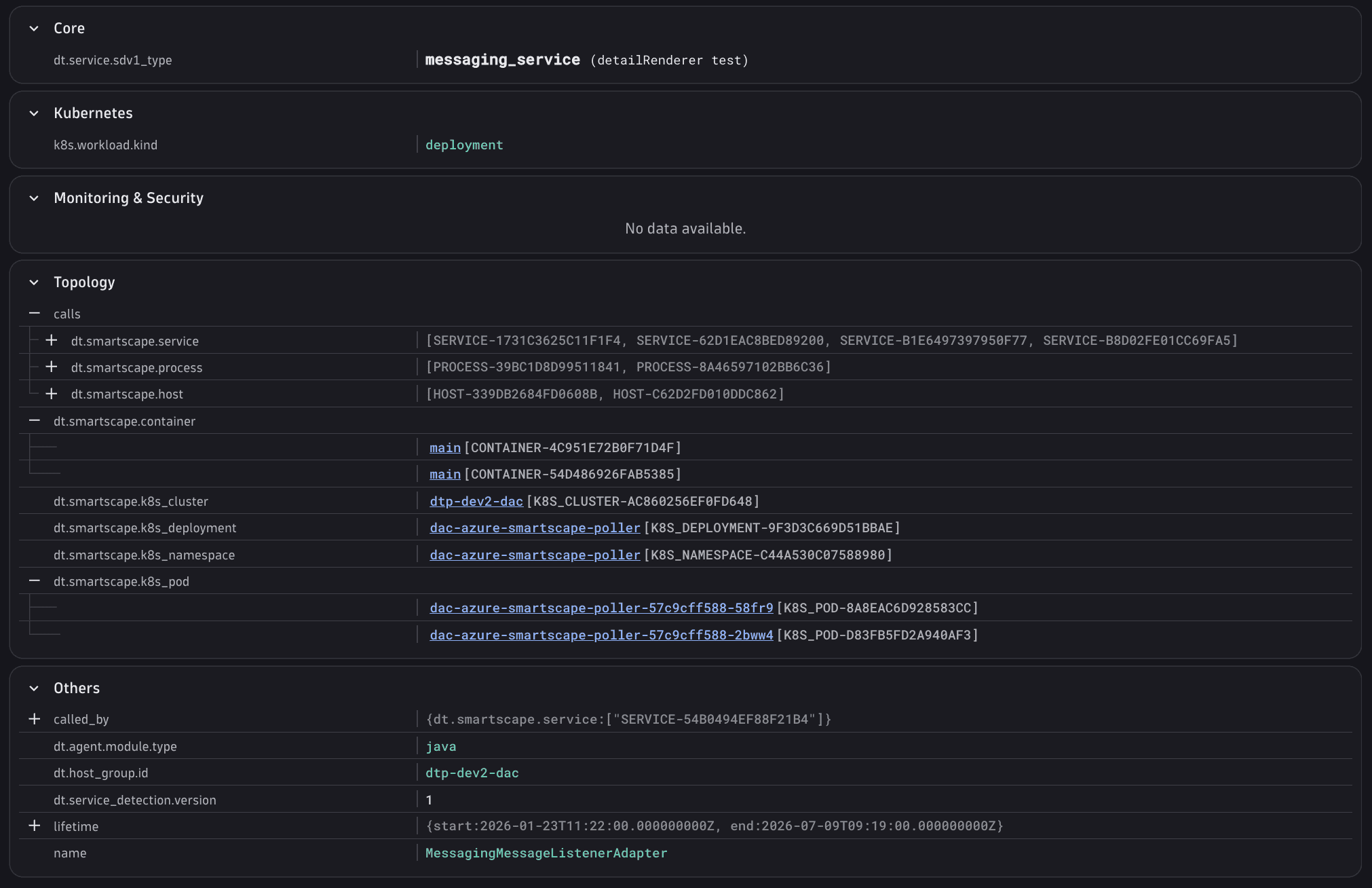
Known top-level group names that organize the property list into accordion sections: 'Core', 'Browser', 'Cloud', 'Code & Performance', 'Database', 'Deployment & Services', 'HTTP & Networking', 'Infrastructure', 'Kubernetes', 'Logs', 'Monitoring & Security', 'Process', 'Business & Custom Attributes', 'Technology', 'Topology', 'Traces', 'Tags & Labels', 'Others'.
These are the only accepted values. Custom section names are not supported. Map domain-specific fields onto the closest existing group.
MetadataFieldSubGroup
Sub-group names nested under their parent: 'Code', 'Performance' (both sub-groups of 'Code & Performance').
Cell action types
Cell action arrays accept both BuiltInAction<T> references and full IntentAction objects. See Elements overview.
| Type | Used in | Built-in literals |
|---|---|---|
|
|
|
Built-in MetadataCellActions literals: 'COPY' (copies the raw value), 'COPY_KEY' (copies the field name), 'COPY_KEY_VALUE' (copies key=value), 'COPY_DISPLAY_NAME' (copies the display label), 'COPY_DISPLAY_VALUE' (copies the formatted value), 'FILTERING' (adds a filter for this field to the wrapping Filtering card).
Example
The example below uses smartscapeNodes "HOST" as the base and adds computed fields via fieldsAdd so that every registry entry has a corresponding column in the result.
{"type": "metadata","id": "host-properties","cardTitle": "Properties","dqlQuery": "smartscapeNodes \"HOST\" | filter id == toSmartscapeId($(nodeId)) | fieldsAdd dt.entity.host = id_classic, dt.smartscape.host = id, owner.teams = array(\"platform-ops\", \"infra-team\"), billing.zone = \"us-east-1\", team.owner = \"platform-ops\", sla.tier = \"gold\", agent.uptime_ms = 2592000000, maintenance.next_window = now(), hw.specs = record(model = \"Dell PowerEdge R750\", cores = 32) | limit 1","overrideMetadataRegistry": {"name": {"displayName": "Host Name","type": "string","fieldGroups": ["Core"]},"tags": {"displayName": "Tags","type": "tags","fieldGroups": ["Tags & Labels"]},"dt.entity.host": {"displayName": "Entity ID","type": "entity_id","fieldGroups": ["Core"]},"dt.smartscape.host": {"displayName": "Smartscape ID","type": "smartscape_id","fieldGroups": ["Core"]},"owner.teams": {"displayName": "Owner Teams","type": "array","fieldGroups": ["Business & Custom Attributes"]},"billing.zone": {"displayName": "Billing Zone","type": "string","fieldGroups": ["Business & Custom Attributes"]},"team.owner": {"displayName": "Owning Team","type": "string","fieldGroups": ["Business & Custom Attributes"]},"sla.tier": {"displayName": "SLA Tier","type": "string","fieldGroups": ["Monitoring & Security"]},"agent.uptime_ms": {"displayName": "Agent Uptime","type": "duration","fieldGroups": ["Infrastructure"]},"maintenance.next_window": {"displayName": "Next Maintenance","type": "timestamp","fieldGroups": ["Monitoring & Security"]},"hw.specs": {"displayName": "Hardware","type": "record","fieldGroups": ["Infrastructure"]}},"keyCellActions": [{ "builtInAction": "COPY_KEY" }],"valueCellActions": [{ "builtInAction": "COPY" },{ "builtInAction": "FILTERING" }]}
See also
 ExtensionsInfrastructure Observability