Network metrics
- Latest Dynatrace
- How-to guide
- Published Jul 07, 2026
Dynatrace's network extensions follow a unified metric model for shaping their data. Using the same model, any integration can benefit of a common layer of understanding and correlation in the Dynatrace platform.
While this model is not enforced, shaping your signals according to it allows you to populate the Smartscape and benefit from common visualizations, health alerts, and warning signals in  Infrastructure & Operations.
What will you learn?
This guide covers reference documentation of fields and metrics as they relate to Dynatrace's Network model. An example is given based on the SNMP datasource along with an example OpenPipeline pipeline. Read along to learn:
- How to adapt any network integration to the model
- How the metrics and their fields relate to Smartscape nodes
- What are the expected benefits from following these guidelines
The network metric model
Device metrics
All device-level metric keys follow the prefix com.dynatrace.extension.network_device and several alternatives are provided
to support the different formats network devices may present this data in.
| Title | Key | Description | Type | Unit | Fields |
|---|---|---|---|---|---|
System uptime |
| The time, in system ticks (1/100 second), since the last system reboot. This metric can also be used to carry all fields required to generate a Smartscape event for the network device node. |
| Centisecond ( |
|
CPU usage |
| The system's CPU usage expressed as a percentage |
| Percent ( |
|
CPU usage ratio |
| The system's CPU usage expressed as a ratio between 0 and 1 |
| Ratio ( |
|
Used memory |
| The amount of memory, in kilobytes, used by the device |
| Kilobyte ( |
|
Free memory |
| The amount of memory, in kilobytes, currently free on the device |
| Kilobyte ( |
|
Total memory |
| The total (used and free) amount of memory, in kilobytes, available on the device |
| Kilobyte ( |
|
Memory usage |
| The current memory used by the device, expressed as a percentage of total memory |
| Percent ( |
|
Interface metrics
All interface-level metric keys follow the prefix com.dynatrace.extension.network_device.if.
| Title | Key | Description | Type | Unit | Fields |
|---|---|---|---|---|---|
Interface status |
| A state metric representing a network interface, whose value is always 1 and its dimensions indicate its state details. This metric can also be used to carry all fields required to generate a Smartscape event for the network interface node. |
| State ( |
|
Traffic in |
| The volume of traffic, in bytes, inbound to the network interface. |
| Byte ( |
|
Traffic out |
| The volume of traffic, in bytes, outbound from the network interface |
| Byte ( |
|
Errors in |
| The number of errors, inbound to the network interface. |
| Count |
|
Errors out |
| The number of errors, outbound from the network interface. |
| Count |
|
Discards in |
| The number of discarded packets, inbound to the network interface. |
| Count |
|
Discards out |
| The number of discarded packets, outbound from the network interface. |
| Count |
|
CRC errors in |
| The number of packets with cyclic redundancy checksum (CRC) errors, inbound to the network interface. |
| Count |
|
Broadcast packets in |
| The number of broadcast packets, inbound to the network interface. |
| Count |
|
Broadcast packets out |
| The number of broadcast packets, outbound from the network interface. |
| Count |
|
Multicast packets in |
| The number of multicast packets, inbound to the network interface. |
| Count |
|
Multicast packets out |
| The number of multicast packets, outbound from the network interface. |
| Count |
|
Unicast packets in |
| The number of unicast packets, inbound to the network interface. |
| Count |
|
Unicast packets out |
| The number of unicast packets, outbound from the network interface. |
| Count |
|
Field definitions
Device fields
Fields that are found on network extension metrics relating to a network device.
Device-identifying fields like chassis.mac, sys.name, and device.address are also included with interface metrics
to support static edge creation in Smartscape processors.
| Attribute | Type | Description | Examples |
|---|---|---|---|
| string | The MAC address of the device chassis; defined as the first non-empty MAC address of the device hosting the interface. |
|
| string | The device's IP address used to collect the metric |
|
| long | The connection port number on the device |
|
| string | A string to represent the broader make, model, or family of network device |
|
| string | The type of monitoring data available for this network device. On metric fields, this should always be set to |
|
| string | A description of the device (system) this metric is related to. |
|
| string | The device (system) name |
|
| string | The LLDP Chassis ID of the network device |
|
| string | The CDP Device ID of this network device |
|
Interface fields
Fields that are found on network extension metrics relating to a network interface.
| Attribute | Type | Description | Examples |
|---|---|---|---|
| string | The admin status of the interface |
|
| string | The type of network interface. If possible, should use the standard types defined by IANA. |
|
| string | An alias of the interface as reported by the network device |
|
| string | A description of the interface as reported by the network device |
|
| string | The name of the interface as reported by the network device |
|
| string | The speed of the interface in bits per second |
|
| string | A MAC address that can be used to identify this interface |
|
| string | The operational status of the interface |
|
Creating an SNMP Extension
Because all of the above details are standard information available with SNMP, we can easily create an extension that shapes its metrics according to this model to use it as an example.
See the full file
name: custom:some.cisco.extensionversion: 1.0.0minDynatraceVersion: 1.333.0author:name: Dynatracesnmp:- group: Networkdimensions:- key: sys.namevalue: oid:1.3.6.1.2.1.1.5.0- key: chassis.macvalue: this:device.chassis_macsubgroups:- name: Device metricsinterval:minutes: 1dimensions:- key: device.typevalue: const:some-cisco-model- key: monitoring.modevalue: const:Extension- key: device.portvalue: this:device.port- key: sys.descriptionvalue: oid:1.3.6.1.2.1.1.1.0- key: lldp.chassis.idvalue: $networkFormat(oid:1.0.8802.1.1.2.1.3.1.0, oid:1.0.8802.1.1.2.1.3.2.0)- key: cdp.device.idvalue: oid:1.3.6.1.4.1.9.9.23.1.3.4.0metrics:- key: com.dynatrace.extension.network_device.sysuptimevalue: oid:1.3.6.1.2.1.1.3.0- key: com.dynatrace.extension.network_device.cpu_usagevalue: oid:1.3.6.1.4.1.9.9.109.1.1.1.1.7type: gauge- key: com.dynatrace.extension.network_device.memory_freevalue: oid:1.3.6.1.4.1.9.9.109.1.1.1.1.17type: gauge- key: com.dynatrace.extension.network_device.memory_usedvalue: oid:1.3.6.1.4.1.9.9.109.1.1.1.1.19type: gauge- name: Interface metricsinterval:minutes: 1table: truedimensions:- key: if.namevalue: oid:1.3.6.1.2.1.31.1.1.1.1- key: if.descrvalue: oid:1.3.6.1.2.1.2.2.1.2- key: if.typevalue: oid:1.3.6.1.2.1.2.2.1.3- key: if.aliasvalue: oid:1.3.6.1.2.1.31.1.1.1.18- key: mac.addressvalue: oid:1.3.6.1.2.1.2.2.1.6- key: if.speedvalue: oid:1.3.6.1.2.1.31.1.1.1.15- key: admin.statusvalue: oid:1.3.6.1.2.1.2.2.1.7- key: oper.statusvalue: oid:1.3.6.1.2.1.2.2.1.8metrics:- key: com.dynatrace.extension.network_device.if.statusvalue: const:1type: gauge- key: com.dynatrace.extension.network_device.if.bytes_in.countvalue: oid:1.3.6.1.2.1.31.1.1.1.6type: count- key: com.dynatrace.extension.network_device.if.bytes_out.countvalue: oid:1.3.6.1.2.1.31.1.1.1.10type: count- key: com.dynatrace.extension.network_device.if.in.errors.countvalue: oid:1.3.6.1.2.1.2.2.1.14type: count- key: com.dynatrace.extension.network_device.if.in.discards.countvalue: oid:1.3.6.1.2.1.2.2.1.13type: count- key: com.dynatrace.extension.network_device.if.out.errors.countvalue: oid:1.3.6.1.2.1.2.2.1.20type: count- key: com.dynatrace.extension.network_device.if.out.discards.countvalue: oid:1.3.6.1.2.1.2.2.1.19type: count- key: com.dynatrace.extension.network_device.if.in.multicast_pkts.countvalue: oid:1.3.6.1.2.1.31.1.1.1.8type: count- key: com.dynatrace.extension.network_device.if.out.multicast_pkts.countvalue: oid:1.3.6.1.2.1.31.1.1.1.12type: count- key: com.dynatrace.extension.network_device.if.in.broadcast_pkts.countvalue: oid:1.3.6.1.2.1.31.1.1.1.9type: count- key: com.dynatrace.extension.network_device.if.out.broadcast_pkts.countvalue: oid:1.3.6.1.2.1.31.1.1.1.13type: count- key: com.dynatrace.extension.network_device.if.in.ucast_pkts.countvalue: oid:1.3.6.1.2.1.31.1.1.1.7type: count- key: com.dynatrace.extension.network_device.if.out.ucast_pkts.countvalue: oid:1.3.6.1.2.1.31.1.1.1.11type: count
Adding a metric pipeline
Because OpenPipeline assets for extensions are decoupled from the main YAML manifest file, the following metric pipeline can be added to any extension that shapes its metric data according to the above guidelines. It can be used as-is for basic node extraction or customized even further based on your requirements.
See the full file
{"displayName": "Custom network metrics pipeline","customId": "extension:custom-network-metrics","metadataList": [],"processing": {"processors": [{"id": "reshape-sysuptime-attributes","description": "Reshaping of fields on sysuptime metric for Smartscape node field extraction","enabled": true,"type": "dql","matcher": "metric.key == \"com.dynatrace.extension.network_device.sysuptime\"","dql": {"script": "fieldsAdd mac=array(chassis.mac), ip=array(toIp(device.address))"}},{"id": "reshape-if.status-attributes","description": "Reshaping of fields on if.status metric for Smartscape node field extraction","enabled": true,"type": "dql","matcher": "metric.key == \"com.dynatrace.extension.network_device.if.status\"","dql": {"script": "fieldsAdd mac=if(isNotNull(mac.address), array(mac.address))"}}]},"smartscapeNodeExtraction": {"processors": [{"id": "network-device-u-sysuptime","description": "Network device upsert from sysuptime metric","matcher": "metric.key == \"com.dynatrace.extension.network_device.sysuptime\"","enabled": true,"type": "smartscapeNode","smartscapeNode": {"nodeType": "EXT_NETWORK_DEVICE","nodeIdFieldName": "dt.smartscape.ext_network_device","idComponents": [{"idComponent": "identifier","referencedFieldName": "chassis.mac"}],"extractNode": true,"nodeName": {"type": "field","field": {"sourceFieldName": "sys.name"}},"fieldsToExtract": [{"fieldName": "mac","referencedFieldName": "mac"},{"fieldName": "ip","referencedFieldName": "ip"},{"fieldName": "snmp.ip","referencedFieldName": "device.address"},{"fieldName": "monitoring_mode","referencedFieldName": "monitoring.mode"},{"fieldName": "device_type","referencedFieldName": "device.type"},{"fieldName": "description","referencedFieldName": "sys.description"},{"fieldName": "lldp.chassis_id","referencedFieldName": "lldp.chassis.id"},{"fieldName": "cdp.device_id","referencedFieldName": "cdp.device.id"}]}},{"id": "network-device-metrics","description": "Network device ID extraction on all extension metrics","matcher": "isNotNull(chassis.mac)","enabled": true,"type": "smartscapeNode","smartscapeNode": {"nodeType": "EXT_NETWORK_DEVICE","nodeIdFieldName": "dt.smartscape.ext_network_device","idComponents": [{"idComponent": "identifier","referencedFieldName": "chassis.mac"}],"extractNode": false}},{"id": "network-interface-u-status","description": "Network interface upsert from status metric","matcher": "metric.key == \"com.dynatrace.extension.network_device.if.status\"","enabled": true,"type": "smartscapeNode","smartscapeNode": {"nodeType": "EXT_NETWORK_INTERFACE","nodeIdFieldName": "dt.smartscape.ext_network_interface","idComponents": [{"idComponent": "name","referencedFieldName": "if.name"},{"idComponent": "device.identifier","referencedFieldName": "chassis.mac"}],"extractNode": true,"nodeName": {"type": "field","field": {"sourceFieldName": "if.name"}},"fieldsToExtract": [{"fieldName": "device.chassis_mac","referencedFieldName": "chassis.mac"},{"fieldName": "mac","referencedFieldName": "mac"},{"fieldName": "operational_status","referencedFieldName": "oper.status"},{"fieldName": "admin_status","referencedFieldName": "admin.status"},{"fieldName": "description","referencedFieldName": "if.descr"},{"fieldName": "speed","referencedFieldName": "if.speed"},{"fieldName": "alias","referencedFieldName": "if.alias"},{"fieldName": "interface_type","referencedFieldName": "if.type"}],"staticEdgesToExtract": [{"edgeType": "belongs_to","targetType": "EXT_NETWORK_DEVICE","targetIdFieldName": "dt.smartscape.ext_network_device"}]}},{"id": "network-interface-metrics","description": "Network interface ID extraction on all interface metrics","matcher": "matchesValue(metric.key, \"com.dynatrace.extension.network_device.if.*\")","enabled": true,"type": "smartscapeNode","smartscapeNode": {"nodeType": "EXT_NETWORK_INTERFACE","nodeIdFieldName": "dt.smartscape.ext_network_interface","idComponents": [{"idComponent": "name","referencedFieldName": "if.name"},{"idComponent": "device.identifier","referencedFieldName": "chassis.mac"}],"extractNode": true}}]}}
For a full explanation of how to populate the Smartscape for network, check out our Network topology guide.
To link the above pipeline to your extension, two additional changes are needed:
-
Create another extension asset (JSON file) to define the ingest source mapping.
{"displayName": "Some Cisco Extension","metadataList": [],"enabled": true,"sourceType": "extension","source": "custom:some.cisco.extension","staticRouting": {"pipelineType": "custom","pipelineId": "extension:custom-network-metrics"}} -
Reference your assets in the extension YAML.
openpipeline:sources:- displayName: Some cisco extensionsourcePath: openpipeline/metrics.source.jsonconfigScope: metricspipelines:- displayName: Some cisco extensionpipelinePath: openpipeline/metrics.pipeline.jsonconfigScope: metrics
Overall, your extension folder should look like this:
extension|-- openpipeline| |-- metrics.source.json| |-- metrics.pipeline.json||-- extension.yaml
Viewing your data
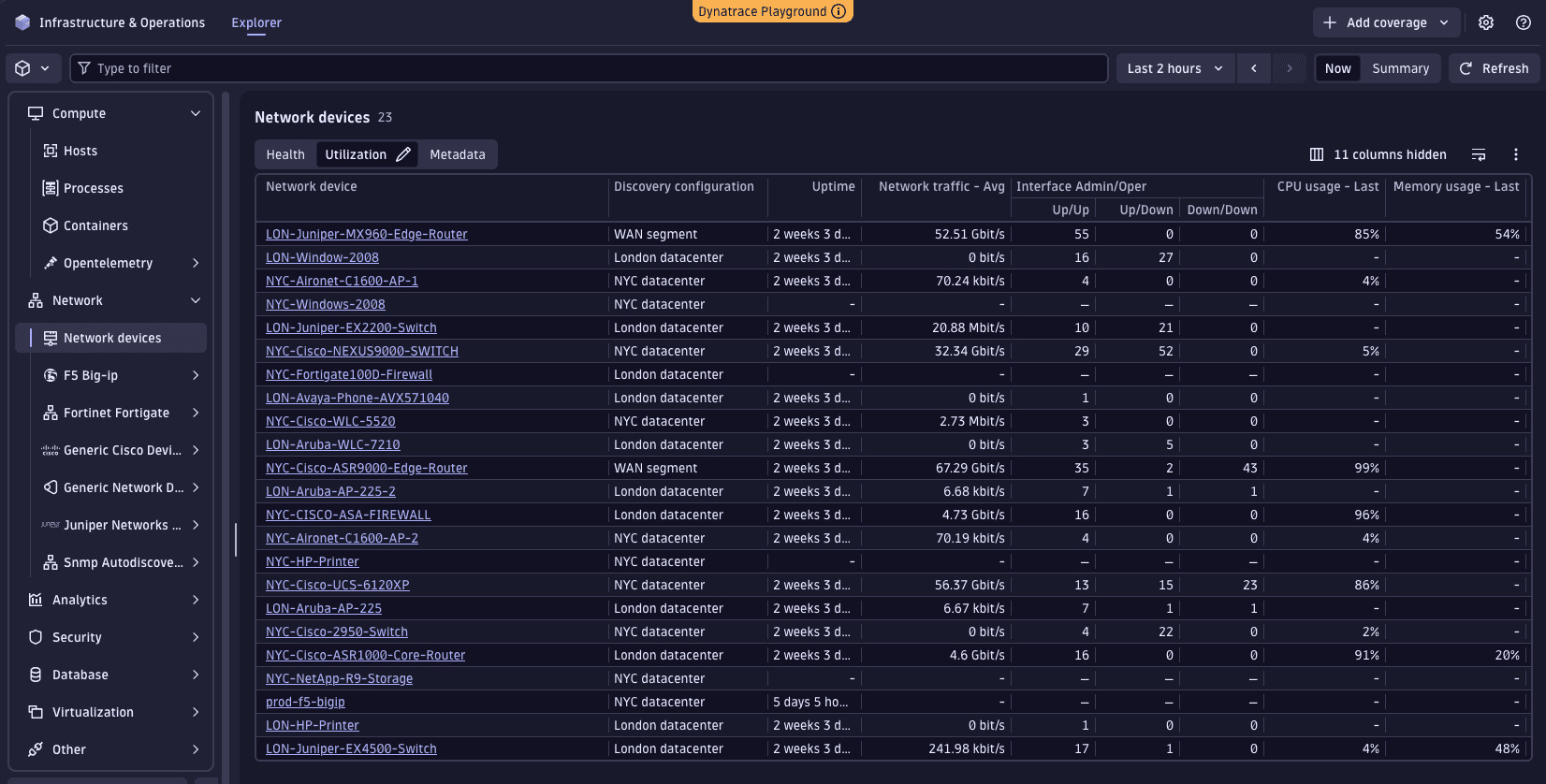
After this extension has been built and uploaded and data is collected from the network device, it will be enriched with Smartscape IDs allowing you to use Infrastructure & Operations to view it.
From the main page, select Network devices, then choose the Utilization perspective. This view is built using the unified metric model along with Smartscape node enrichment.