EdgeConnect concepts
- Latest Dynatrace
- Explanation
- 5-min read
- Published Oct 01, 2026
This page explains how EdgeConnect provides secure access to services in your private network for Dynatrace apps, workflows, and functions. It also covers host patterns, host mappings, multiple instances, and least-privilege security.
How EdgeConnect works
EdgeConnect connects to AppEngine and runs selected HTTP(S) requests inside your network on behalf of the Dynatrace runtime. In the following diagram, each arrow indicates which side starts the connection.
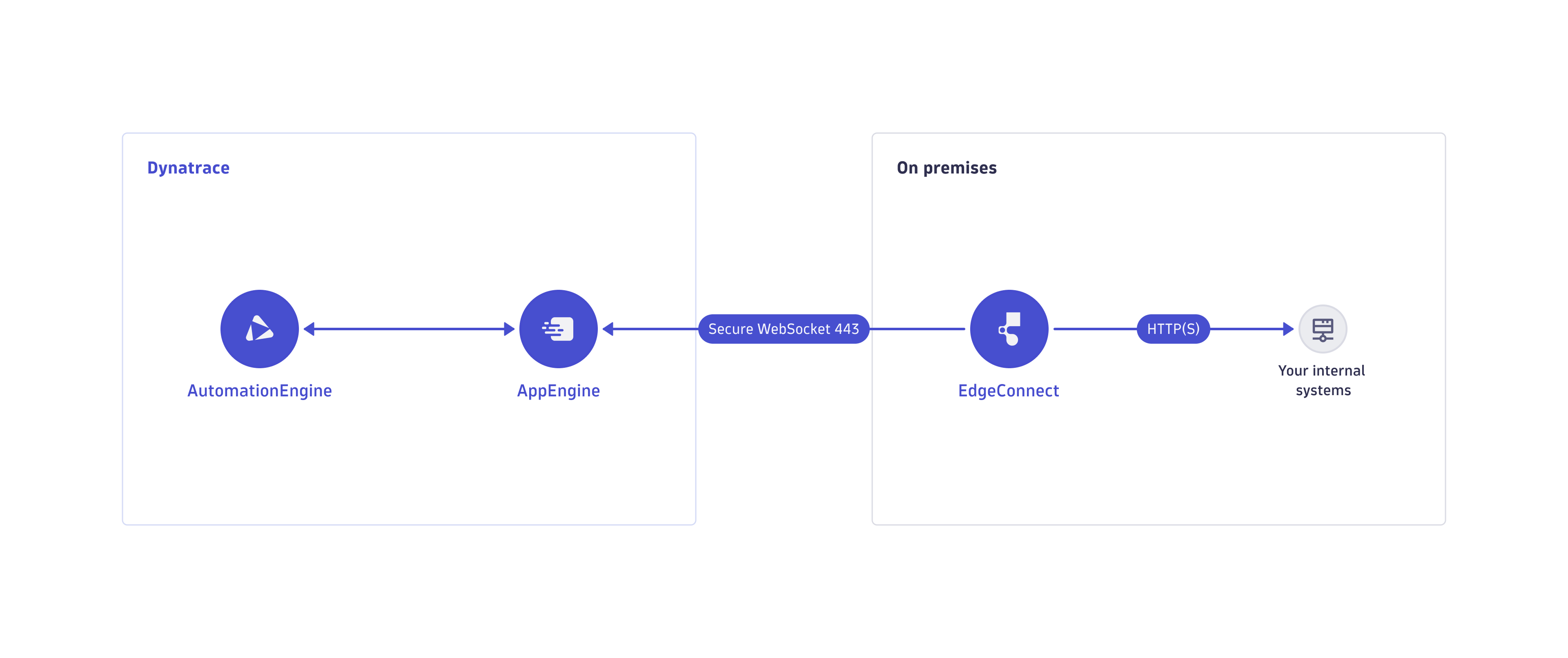
The diagram shows the default deployment:
- EdgeConnect runs as a container inside your network.
- It opens an outbound WebSocket Secure connection (WSS/443) to AppEngine. No inbound firewall rules are needed.
- When an app function, ad hoc function, or workflow action targets a host that matches a configured host pattern, the Dynatrace runtime forwards the request to EdgeConnect over a WebSocket connection.
- EdgeConnect performs the HTTP(S) call to the internal target and returns the response.
EdgeConnect behind a proxy
EdgeConnect can also operate behind an HTTP proxy.
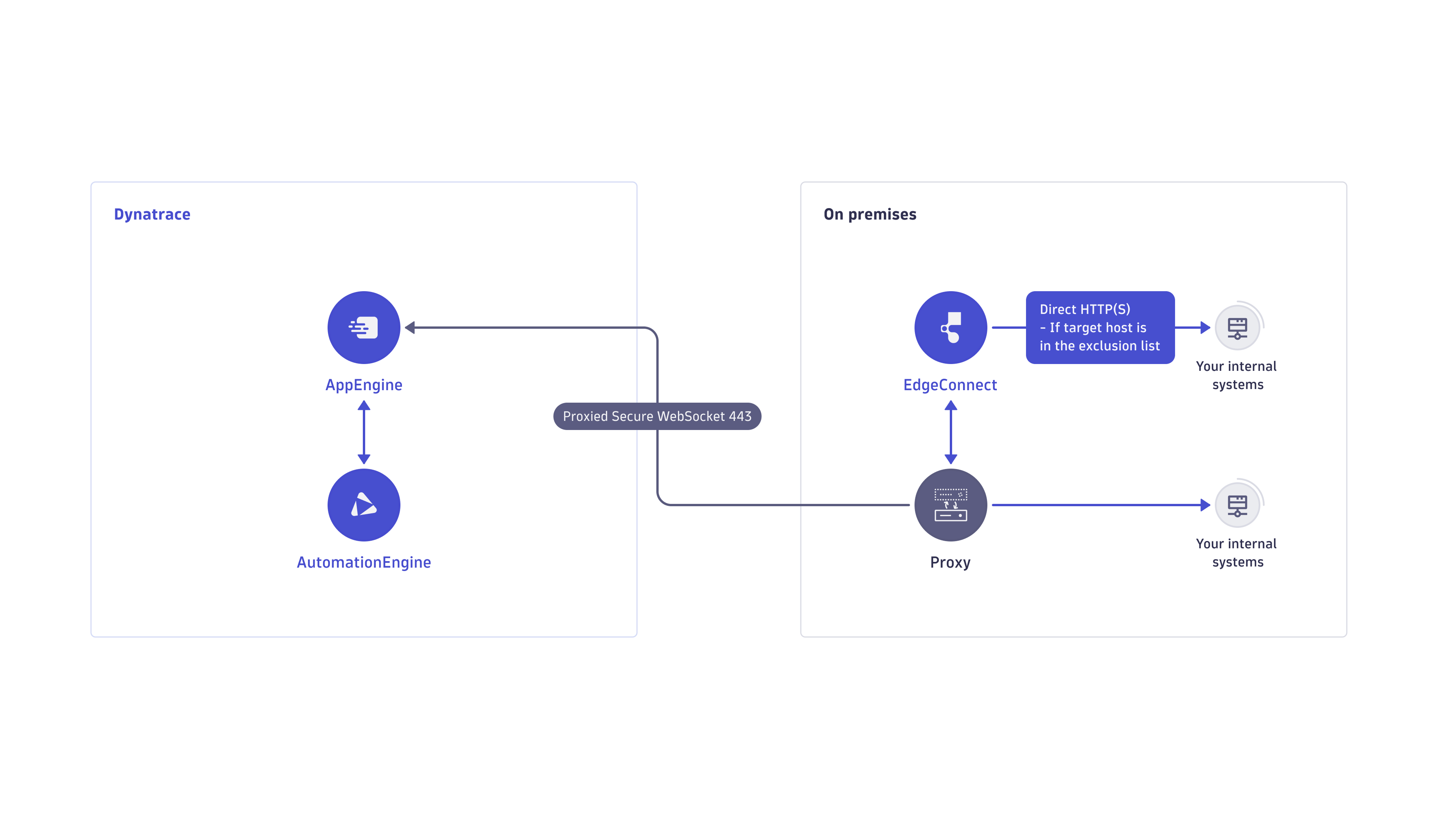
The proxy variant uses the same model, with two differences:
- EdgeConnect routes both its WebSocket connection to AppEngine and its outbound HTTP(S) requests through a forward proxy.
- Proxy address, port, and credentials are configured in
edgeConnect.yaml.
If you're using EdgeConnect behind an HTTP proxy that performs TLS interception, add the proxy's certificate to the certificate_paths field to allow EdgeConnect to verify the proxy's identity.
Host patterns
A host pattern is a hostname or wildcard that determines which EdgeConnect configuration handles an HTTP(S) request. The Dynatrace runtime matches the host of each outgoing request against the configured host patterns and selects the corresponding EdgeConnect configuration.
Hostname matching follows three rules.
- Uniqueness: A single host pattern can belong to only one EdgeConnect configuration. It can't be shared across configurations.
- Wildcards: A host pattern can use a wildcard (
*) at the start of a host to match multiple hostnames. - Specificity: Host patterns can overlap across configurations. When more than one pattern matches a request, the Dynatrace runtime selects the configuration with the most specific matching pattern. The selected configuration for a URL is always deterministic.
To create host patterns, see Configure EdgeConnect in Dynatrace. To test which configuration handles a given URL, see Test EdgeConnect routing.
How EdgeConnect selects a host pattern
The following example shows how EdgeConnect selects a configuration when a request matches multiple host patterns.
Assume you have two configurations:
- For
staging, with the patternstaging.myapp.org. - For
prod, with the wildcard pattern*.myapp.org, which matches any subdomain, includingstaging.myapp.organdprod.myapp.org.
Because host patterns must be unique, no other configuration can use either pattern.
A request to https://staging.myapp.org/test.html matches both configurations. In this case, the more specific staging.myapp.org pattern takes precedence, so the request is routed to the staging configuration.
Host mappings
Because host patterns must be unique, multiple configurations can't use the same hostname. For example:
- Services running on
localhost. - The Kubernetes API at
kubernetes.default.svc.cluster.local, accessed from multiple clusters.
To address this, use host mappings. Configure a unique host pattern for each EdgeConnect configuration and map it to the shared internal hostname. When a request matches the host pattern, EdgeConnect rewrites the host to the mapped internal hostname before sending the request.
This resolves two common shared-hostname scenarios:
- Multiple services on localhost: Each configuration uses a unique, localhost-prefixed pattern mapped back to
localhost, isolating services that share the same address. See Multiple services on localhost. - Multiple Kubernetes clusters: Each cluster uses a unique pattern mapped back to the shared
kubernetes.default.svc.cluster.local, keeping every cluster independently reachable. See Multiple Kubernetes clusters and the implementation walkthrough.
Multiple instances
For each EdgeConnect configuration, you can deploy multiple container instances to balance the request load across them. Matching requests are distributed across EdgeConnect instances with free capacity.
For multi-configuration and multi-cluster setups, see Manage multiple EdgeConnect configurations and instances.
Security model
EdgeConnect follows the least-privilege principle, providing access only to the resources and network paths required for its operation.
Secure request handling
- EdgeConnect establishes an outbound secure WebSocket (WSS/443) connection to AppEngine. Because EdgeConnect initiates the connection, it doesn't require any inbound network access.
- EdgeConnect works in the environment context and transparently performs any HTTP(S) requests in AppEngine matching the defined host patterns. Anyone with the permissions to trigger an app function, ad hoc JavaScript, or workflow in an environment can issue HTTP(S) requests to the matching hosts.
Recommended practices
- Restrict EdgeConnect deployments to only the network required to reach the intended systems.
- Define the EdgeConnect host pattern configuration as specifically as possible so only the required HTTP(S) requests are forwarded.
- Use the EdgeConnect local configuration to restrict the hosts EdgeConnect can reach. Defined host patterns can never exceed the local host restriction. A local host restriction alone doesn't result in any HTTP(S) request forwarding. For details, see the optional
restrict_hosts_toproperty. - Scope each secret with
restrict_hosts_toso its token can't reach an unintended host. For details, see Inject secrets into requests and Secrets.