Add and access validation insight links
- Latest Dynatrace
- How-to guide
- 2-min read
- Published Feb 17, 2026
Add validation insight links to provide contextual information and resources for an objective. Using validation insight links, you can go directly to dashboards, notebooks, or external tools such as SonarQube.
How to add and access validation insight links
To add a validation insight link:
- Go to your guardian.
- Select your objective.
- On the right-hand side, select Add link.
- Enter the dashboard, notebook, or SonarQube URL in the Enter or paste the link field.
These validation insight links are visible as Validation insights for the objective.
- You can add up to five links per objective.
- Links must be valid HTTPS URLs.
- Display text for each link is optional.
Access validation insight links from  Site Reliability Guardian:
-
Go to your guardian.
-
Select Analyze.
-
Go to the Validation result section. The links are under Validation insights for the objective.
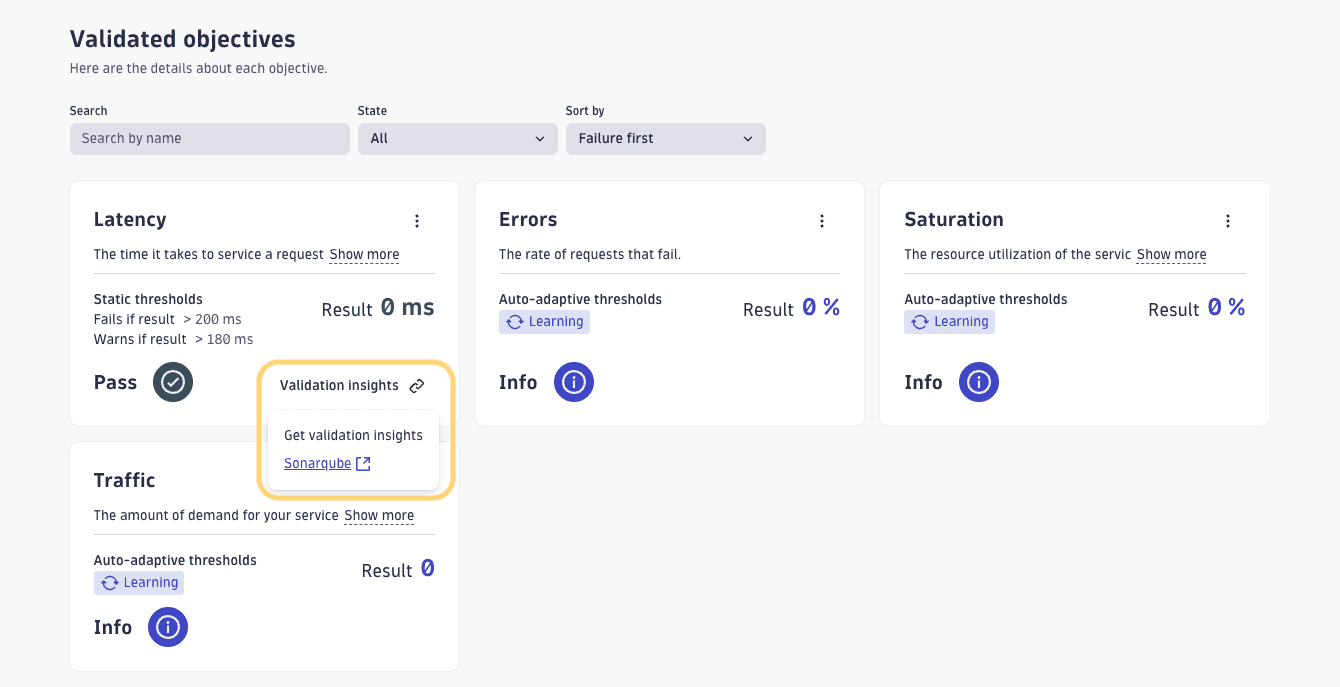 Validation Insights on Analysis Page
Access validation insight links using DQL:
-
For Lifecycle guardians, you can find the validation insights for the event type
validation.objectivein the propertydt.srg.objective.Here is an example query for Lifecycle guardian:
fetch events| filter event.kind == "SDLC_EVENT"| filter event.type == "validation.objective"| filter event.provider == "dynatrace.site.reliability.guardian"| fields dt.srg.objective -
For Business guardians, you can find the objective links for the event type
guardian.validation.objectivein the propertyguardian.objective.Here is an example query for Business guardian:
fetch bizevents| filter event.provider == "dynatrace.site.reliability.guardian"| filter event.type == "guardian.validation.objective"| fields guardian.objective
Next steps
Take a look at Guardian execution context. Use events from your Continuous Integration (CI) tool to send them to Dynatrace, which, in turn, can trigger validation of your guardian in a workflow.